I am an Engineer in the Boston area. I like making things, teaching people how to make things, and tea. This blog is documents the things I make and do, and provides instructions on how to do the things I do, or make the things I make.
I recently found out my sola 2000 torch is torched- water got in and corroded the connectors. while it might be technically salvageable, I used this as an excuse to start another project- a canister dive light. I love my sola light, but the battery does not quite last two dives, especially at full blast. This means I need to bring two lights, two chargers, and two lights, and that is a little inconvenient. It also means I spend a lot of time futzing around underwater going from low to high power mode. This is surprisingly annoying, especially since I have to use two hands to switch modes.
Armed with google, hubris, and kicad I set out to design my own dive light.
Design Goals:
The goal is to build a dive light, with spot and flood modes, just like the sola lights. I want a burn time of at least 3 hours at a reasonable brightness- this is well over two recreational dives. I want it to be a canister light so I can run it full blast for the whole dive, temperature permitting. And I want it to be about as bright as the sola lights. And small. And I want a pony to go with it (kidding).
Optics and LED choices
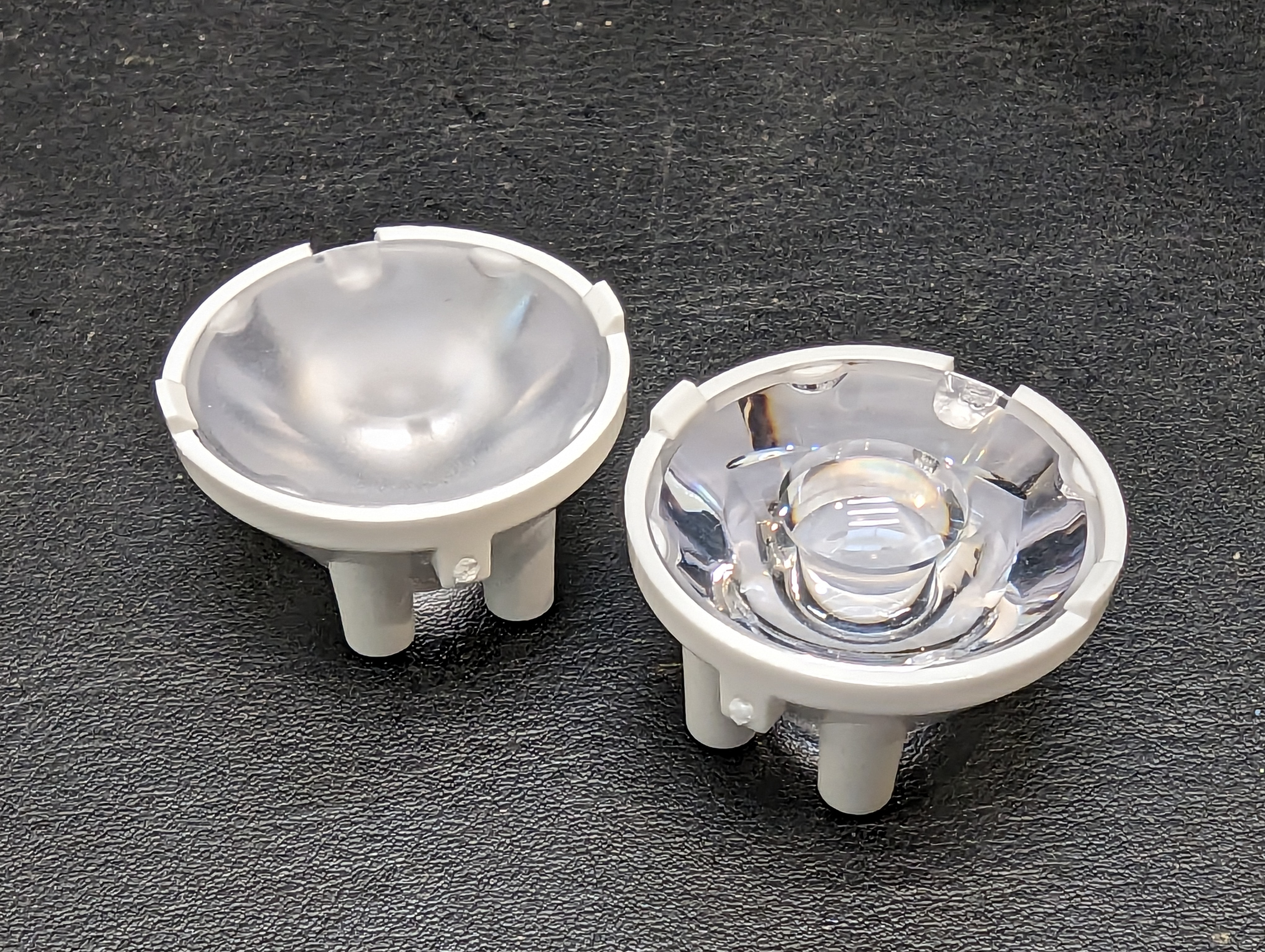
There are a lot of constraints on this project, starting with thermal and optical considerations. There are only so many off the shelf optics, and without much in the way of a mechanical prototyping department, I want to minimize iterations. The simplest way to do this was with single LEDs and off the shelf optics. Carclo has not only an impressive array of parts to buy, but they also have charts/images to go with the optics with different base LEDs.
The problem with single LEDS is that the efficiency of the LED suffers at high outputs. This creates a lot of heat. Hopefully I can use the ocean as a heatsink. CREE seems to make hands-down the best high output LEDS, and after some careful considerations of what is available in low quantities, I decided on one XP50.3 and one XP70.3 LED. Two XP70.3’s would be better, but the beam pattern on the spot light would be too wide, since I can only get the XP70.3 with a dome lens.
Driver
Next up was the driver. It seems pretty useless to have spot and flood lighting on at the same time, and as you can see, the PCB does not have a lot of room on it for another big driver and inductor. Instead, I intend to share the high-side LED driver across both LEDs by low-side switching them. The header on top is for programming, and as a breakout for interesting pins.
Microcontroller Selection
I begrudgingly picked the ESP32 as my microcontroller. It seems like a shame to have and not use a ton of the peripherals on there, but its cheap (compared to an attiny), small (but still has a lot of pins), and in stock (unlike the atsamd series). This requires a 3v3 regulator, and due to size and laziness constraints I opted for an integrated DC-DC module. These are awesome, cheap, and easy to assemble, which is nice because I already had a lot of 0402 parts.
Emitter (LED) Board
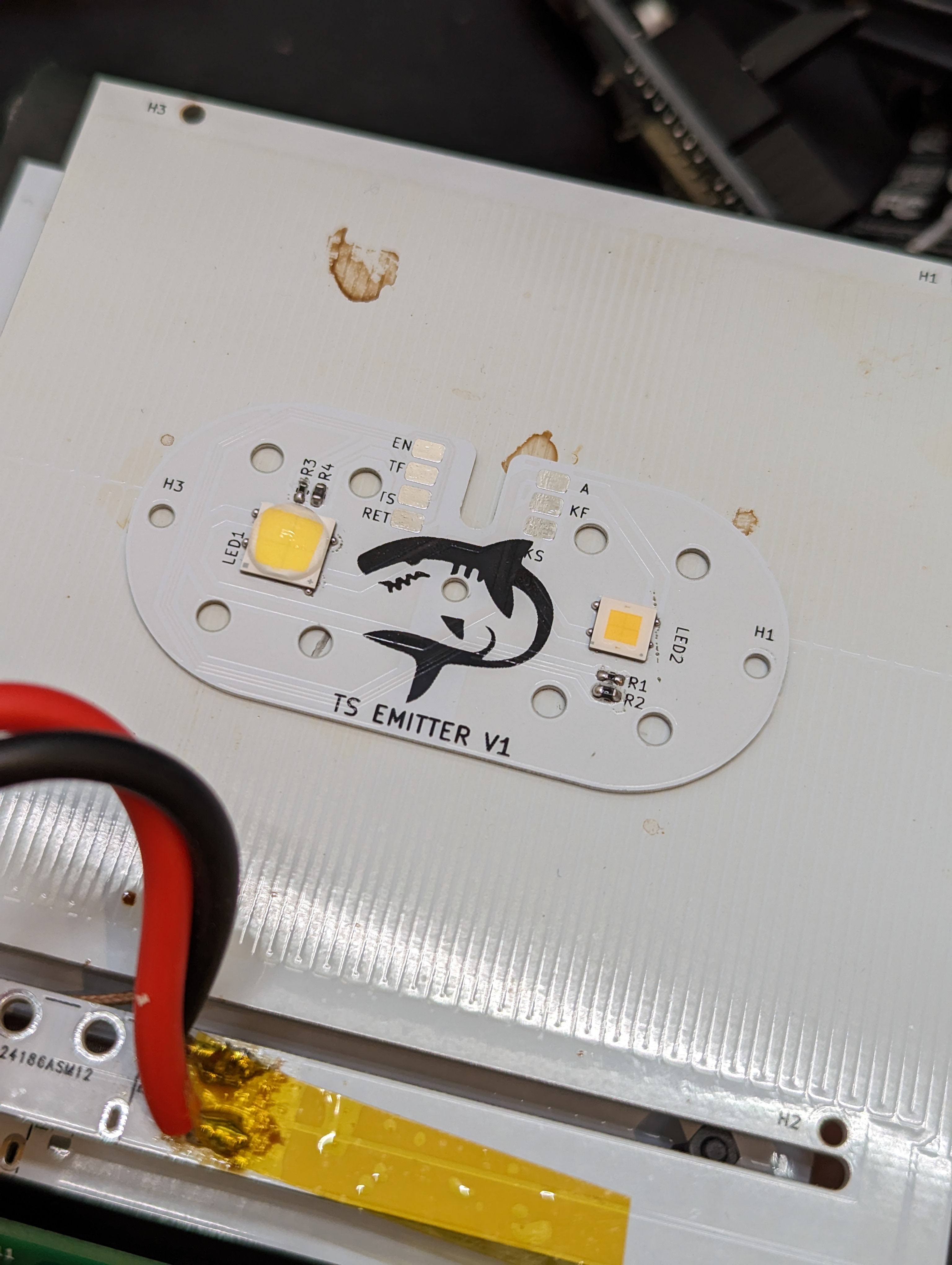
The emitter board is aluminum, for better heat conductivity. At full blast, this will need to dissipate ~30W! In addition to LEDS, there are a couple thermistors for temperature measurements, placed near the LEDs. Given that each LED is a multi-watt heater that could probably melt itself off the board (with low temp solder), it seems prudent to monitor temperatures.
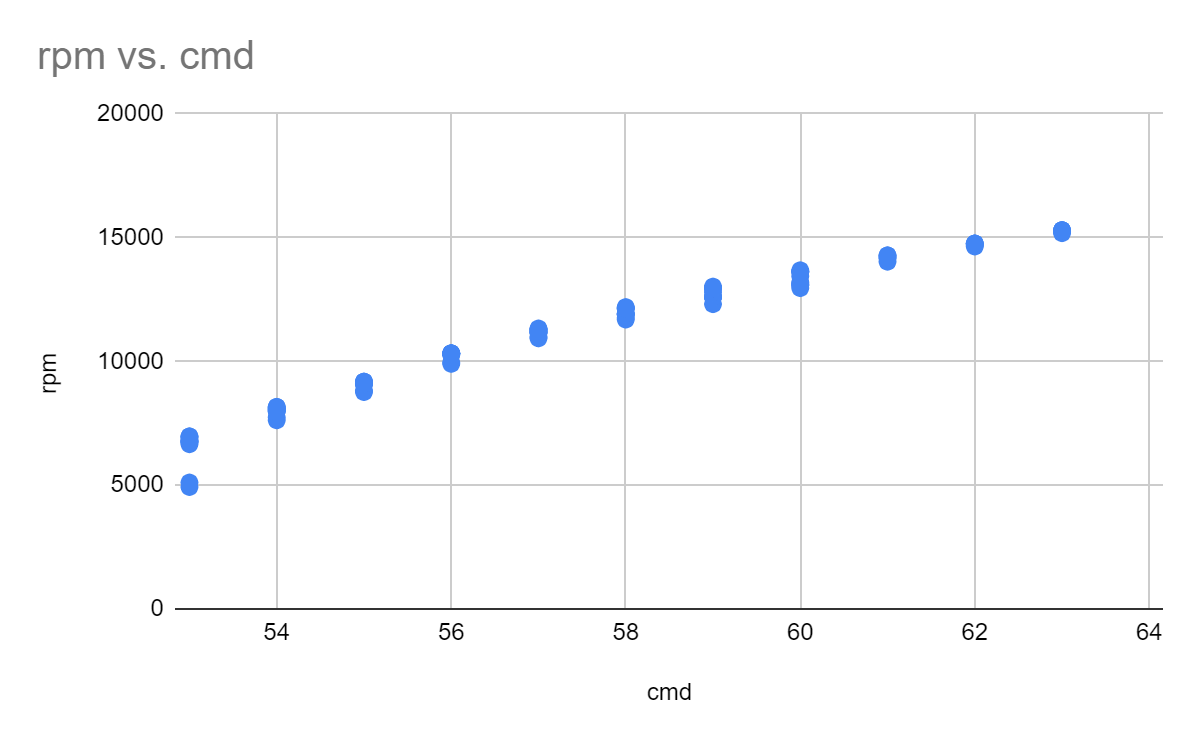
With the tachometer done, the next step was to get the ancient BLDC and ESC wired up and figure out how fast they were spinning. I know that the motor spins very fast but I really didn’t know how fast it was. It turns out that the speed is mostly too fast.
Here I plotted the RPM vs input command, which is basically in “hobby servo degrees” since that is how the ESC expects to get commands- a pulse every 20ms where the width of the pulse corresponds to…something. I mostly care about speeds between 5-10k, which gives me about 4 settings. I suspect that by decreasing the voltage of the power supply, I could decrease the minimum speed by limiting the free-run voltage across the motor.
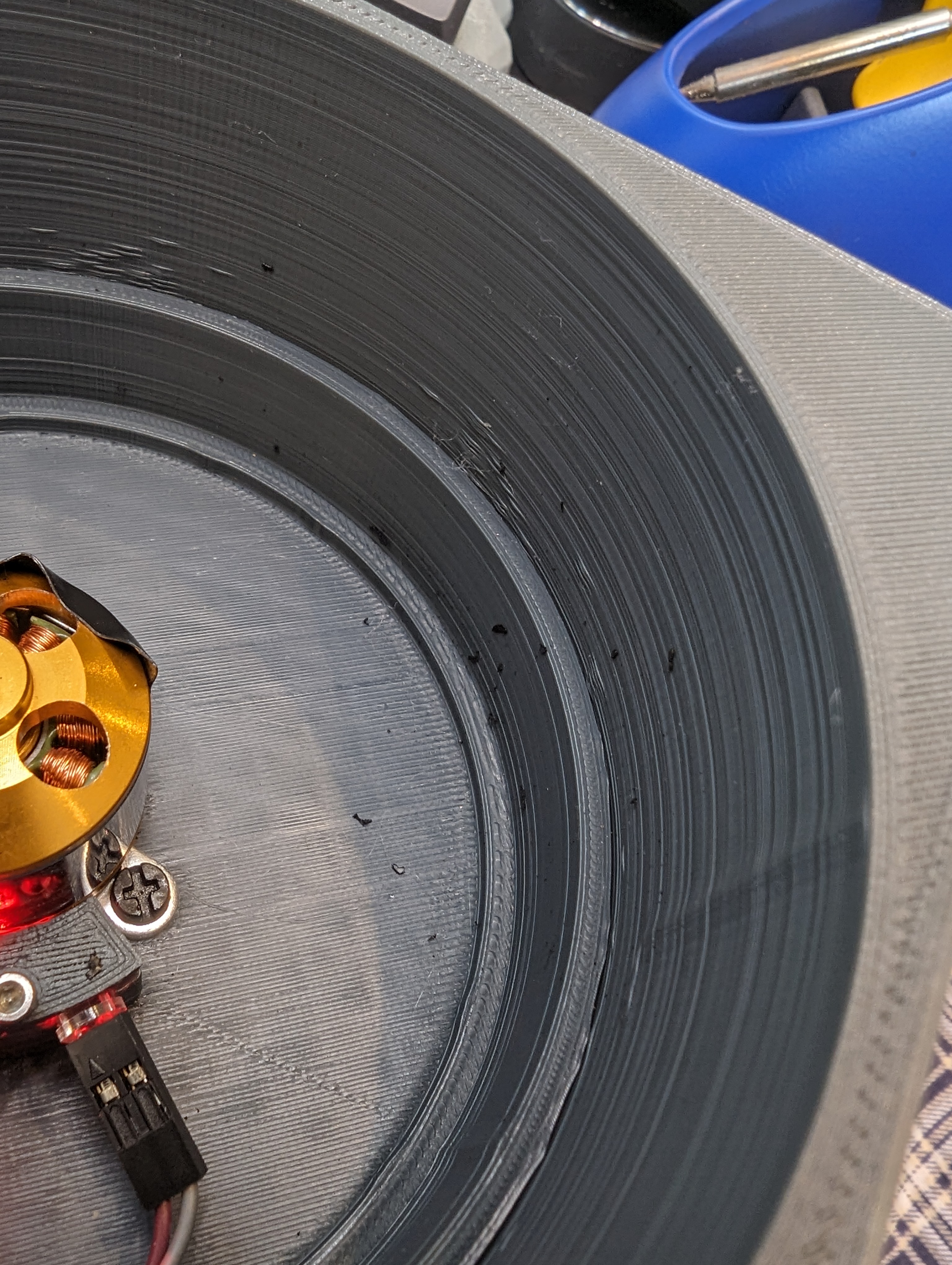
As I said, its not clear exactly what the mapping is from pulses to rpm, since I don’t really know how the controller works- is it closed loop? is speed control achieved with voltage limiting, or is there actually feedback? Right now it doesn’t matter since my goal is just to make things spin fast. As you can see here, the motor spun fast enough that the tape I was using as part of the encoder ripped itself off and disintegrated all over the inside of the container.
Next Up: A PCB
absolute chaos
Based on a lot of really annoying fiddling and having parts get de-soldered during assembly, I have decided I really need a PCB for this project to prevent it from self-destructing by vibrating my deadbug soldering apart. A display, and maybe some buttons would help make it fully usable.
I ended up with a day to work on my spin coater in between a few other projects. Originally, I wanted to make a nice spin coater but because I am basing the design on a random ESC and motor that I bought 5 years ago, I decided the rest of the build would come from the junk bin as well- at least that would be fast.
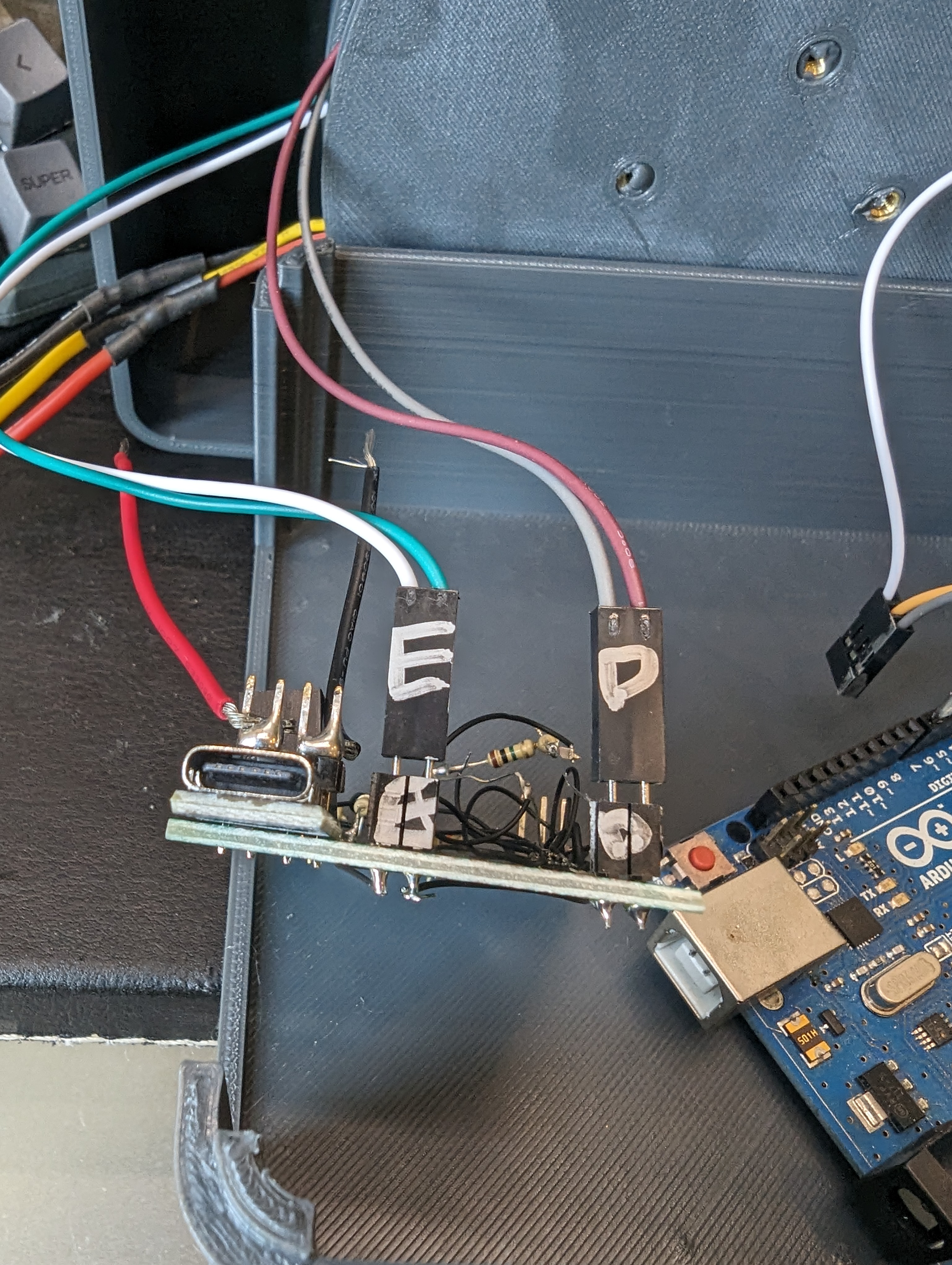
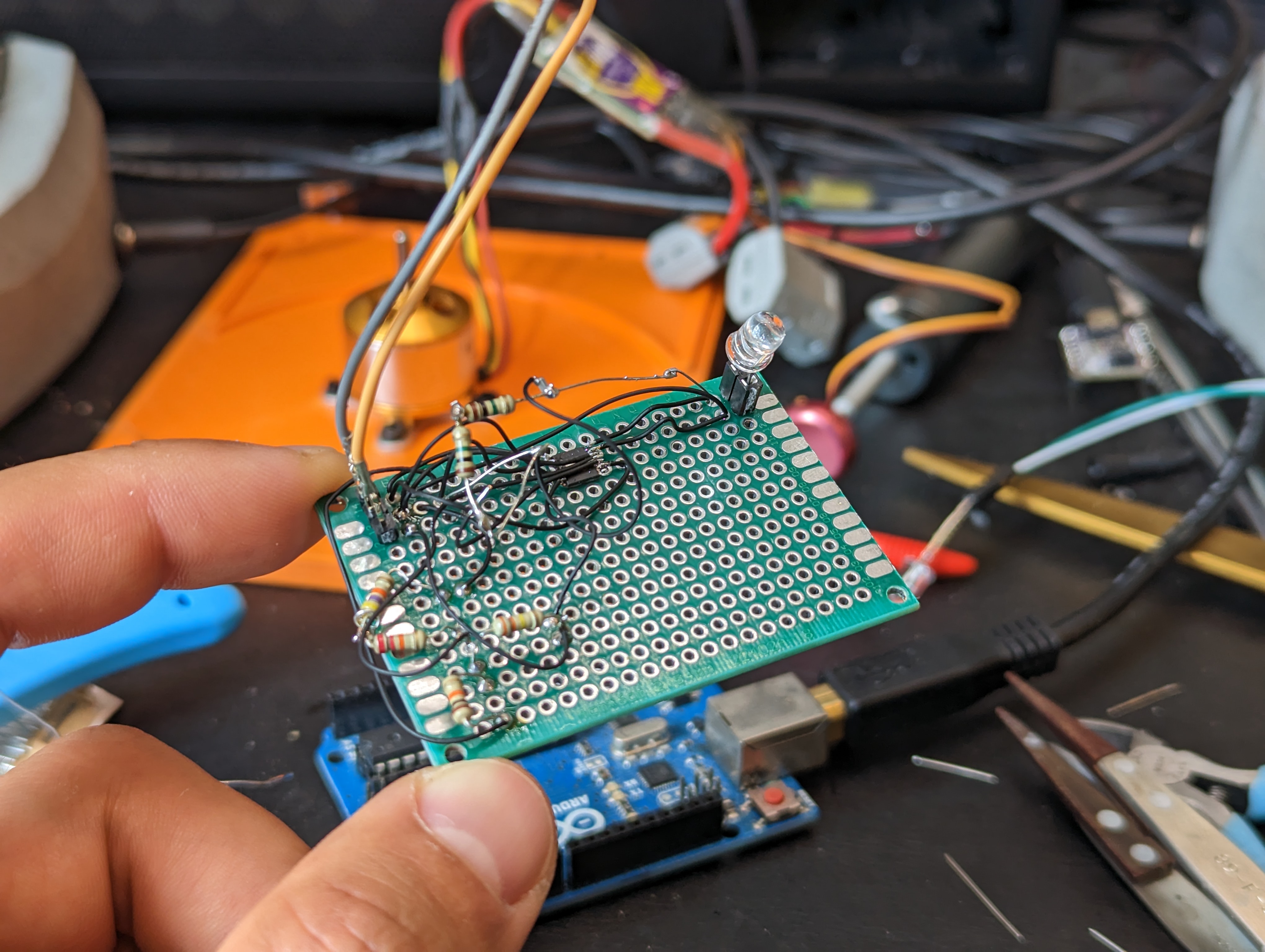
One component I don’t often use (aka have in the junk bins) are “fast” analog light sensors, like the kind you would use for a tachometer. However, I do have a lot of LEDs, and I managed to find one single op amp part in my junk bin, and so I figured I could either spend a day designing a pcb that would come in 2 weeks, or spend one day hacking together a tach.
My goal was to get a digital signal out of the system, where one rising or falling edge corresponds to one revolution of the motor. I want to run this motor from about 5-10k RPM, which means each revolution is 100 uS. Detecting something every 100uS is pretty slow in circuit land, so I was not worried about the speed of the electronics.
LED as a photodiode
I know that an LED can be used as a tiny tiny current source, and that there are two common ways to amplify it- with a transistor or with an opamp. I tried a transistor to start, since I knew I had some 3904s stashed away from an old project. However, this did not give me enough gain- the signal was only about 100-200mV with a bright light shining into the LED. I didn’t try the darlington pair, because later I found out I did have three (3) dual op amps in my junk bin.
I ordered three ALM2403QPWPQ1’s for some reason in 2021. I have no idea why, but I was pleased to find out that I had an op amp on hand. Fortunately, these are .65 mm pitch parts- that makes a big difference compared to .5 mm pitch parts for unaided hand soldering, deadbug style (note to self: buy microscope).
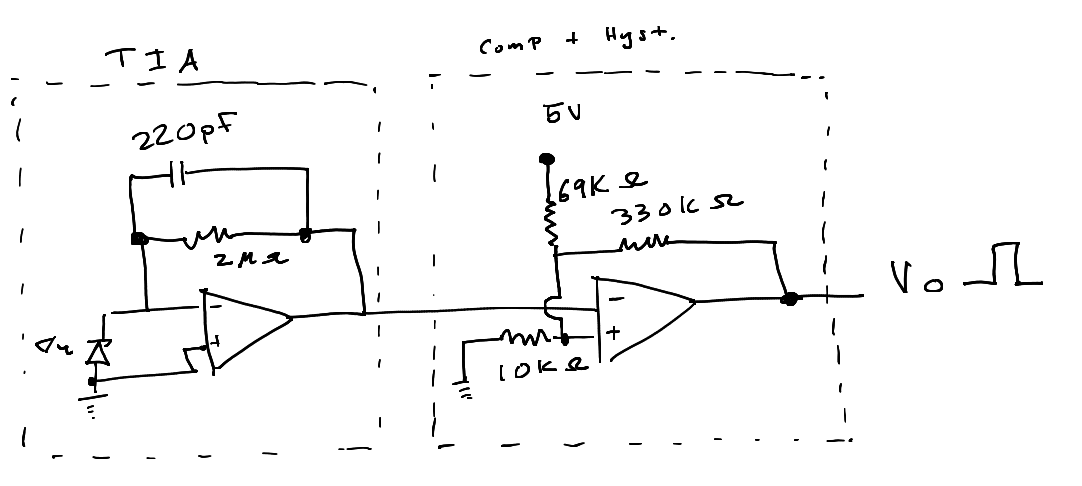
With these dual op amps, I could actually get everything I needed out of a single chip. The first stage is a transimpedance amplifier with the photodiode as a current source. This takes the current generated by the photodiode and turns it into a voltage. In theory it should be pretty linear with incident light, but I didn’t test this.
Since I have no idea where my LEDs came from (junk bin leds!) I just stuck in the values from the make article linked above (by Forrest Mims). This seemed to work well enough, but and testing showed that increasing the feedback resistor to 2Mohms gave me suitable gain, with an output around 1.5-2V. This signal gets fed into a comparator block later, so the actual value is not too critical- just that the signal has a wide enough swing.
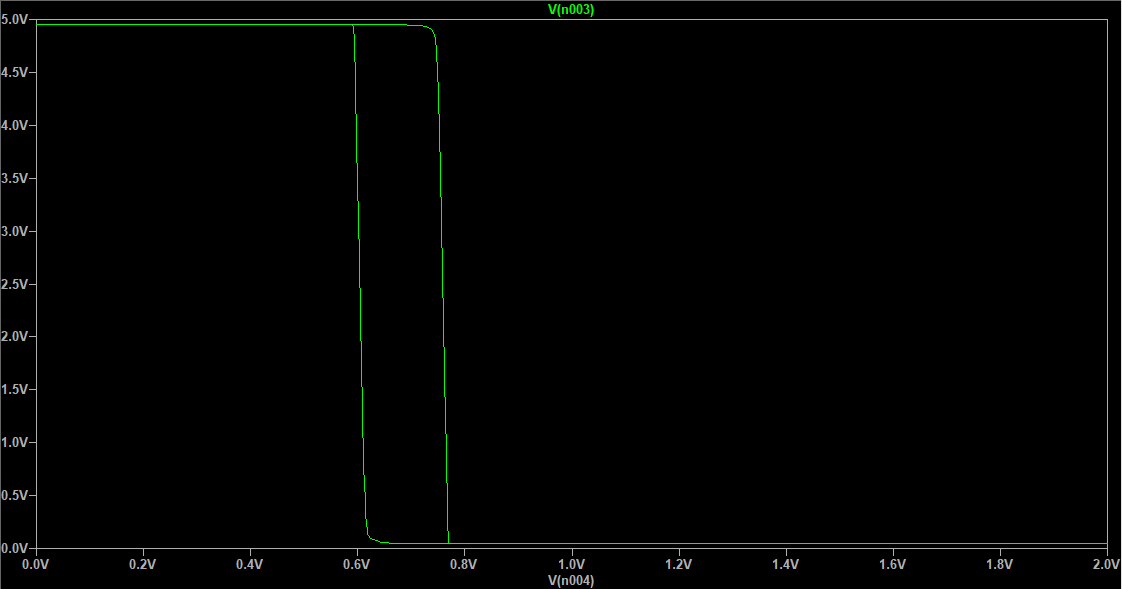
The comparator block is built out of the second op amp, resistors I had lying around, careful soldering, and this app note on adding hysteresis a comparator. I had to tweak the values to the resistors values I could make, but after some simulation I got a suitable result. Here you can see the .2 V of hysteresis in a plot of input vs output voltage.
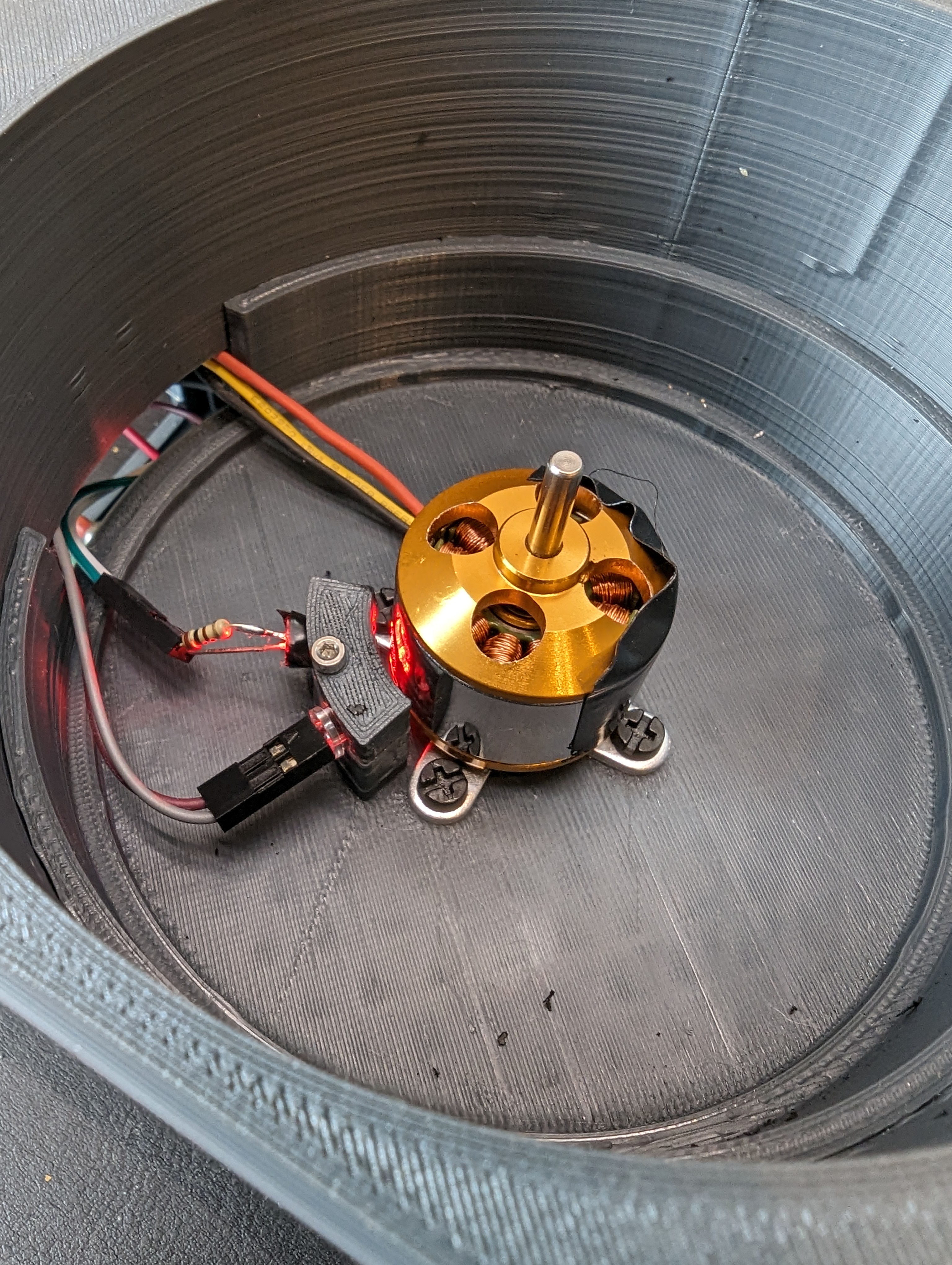
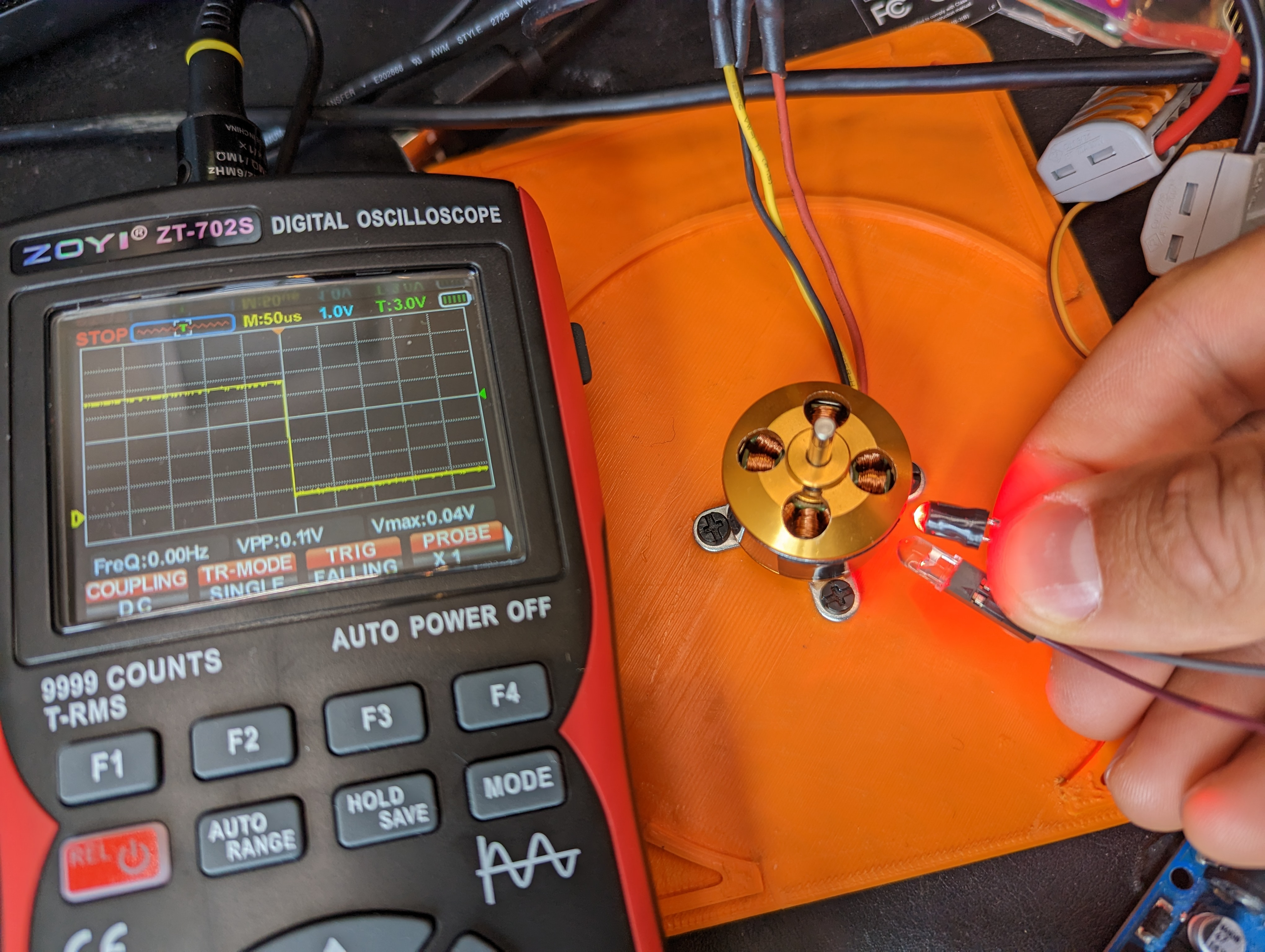
As you can see in the title photo, this produces a nice clean edge as the motor body (shiny) transitions to the tape (black, not shiny) that I stuck on it. Now its back to the mechanical drawing board to make a platformt to test/write software, and time to order a VERY simple PCB for when my questionable soldering starts to fall apart.
New Tool: ZOYI ZT-702S
A one new tool that made this way easier was the ZOYI ZT-702S. I bought this to augment my basic multimeter. I was skeptical of the oscilliscope feature after suffering through quite a few substandard scopes.
It turns out to be a total delight to use, and it is great for simple stuff like this where I want to look at some quickly changing value or to measure a rise time or to see if a signal is ok. It physically much easier than breaking out my big scope (because the big scope is VERY big). The portability also seems awesome- I have done all kinds of nonsense where I need to measure a sensor in the field and a multimeter is okay, but a very basic scope would be way better. This thing rules! It can even take screenshots, and the menus are straightforward.
My main gripe so far is that the auto range button exists- since its next to the hold button, I press it by accident sometimes and this resets my measurements and puts the scope in AC mode, instead of restarting the triggered data.
As a basic multimeter it also does fine, and the continuity beeper is very fast, and the probes are pretty nice. I am excited to add this to the toolbox!
In my last post I described the challenges in using the LT3750 as a high voltage power supply. Namely, the power supply needs to be restarted after it reaches its target voltage, since it is a one-shot “charger”. An additional problem is that when inspecting the output voltage, it didn’t quite match the calculated output.
Output Discrepancy
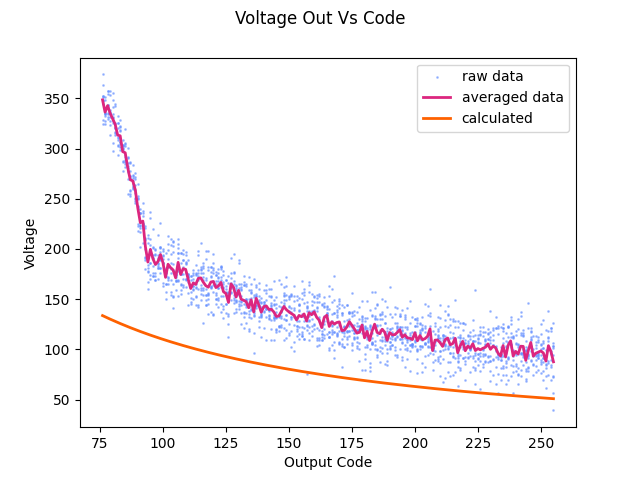
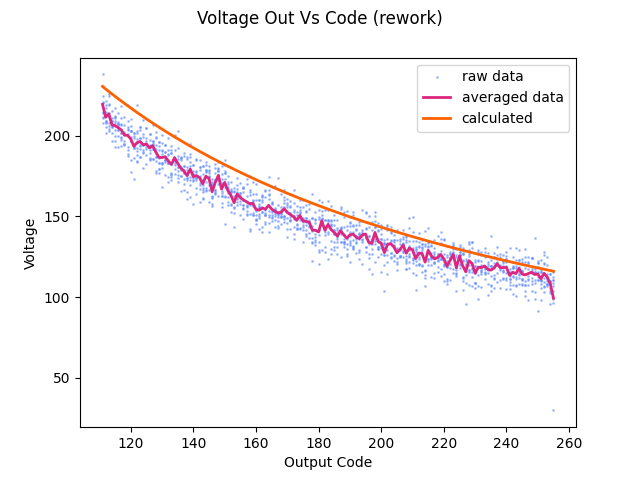
It was surprising to get this plot of expected vs measured output, as reported by the power supply. I would expect some scaling to be wrong, or to have some DC offset due to reworking the voltage divider with 5% resistors instead of 1%, but the hockey stick on the left side of the plot is pretty egregious. Not only do the values take off there, but the concavity of the line actually seems to change! This needed further investigation.
I actually didn’t believe it at first, but after verifying the plot with a few other instruments, and after testing the ADC, rechecking the voltage divider, and a lot of head scratching I realized the problem was in the LT3750, not in the rest of the circuitry.
This was puzzling because on the surface the circuit seemed to do what I expected, aside from the range of 75-100 counts (RBg max = 970 ohms). After scouring the datasheet, I realized that there is a limit on the current into the RVout pin of 1mA. This is not really highlighted in the datasheet. I had calculated a 12k resistor for Rvout in order to get a wide Vout range. However, this violated the rule for for Rvout, and my suspicion is that the proportional current source cant keep up, meaning Vrbg has a hard time overcoming the voltage in the vout comparator, resulting in an overshoot in the output voltage.
With this hunch, I replaced Rvout with a 27k resistor. This narrowed the usable output range by bringing up the minimum output voltage- ouput voltage is proportional to Rvout/Rbg, so its easy to have a higher voltage. Rbg is limited, per the datasheet, to 2.5k or less. This is annoying, since it would be nice to have a range from about 60V-300V, because my bench supply tops out at 60V. however, at the expected output voltage, the 27k resistor nearly limits the input current to 1mA, so it would be hard to go much smaller.
At least the output is sane now! Ultimately, I could introduce another digipot on the RVout side, but its probably not worth the hassle and the cost of another set of parts for what I want to do with this. The right way to get this power supply might actually be to just use something with continuous feedback to avoid having to kick off another charge cycle.
Output Accuracy:
With the output related to the input, the next step was to relate the potentiometer codes to output voltage. Sadly, this needed to be compared to some instrument, and my multimeter does not have peak hold. So I hooked the supply up to my scope and measured the peak voltage (for a few cycles) per code. I know the expression for the output code is:
Where B is the terminal resistance/parasitic resistance of the digipot (Rbg), and A is a bunch of stuff (turns ratio, a constant, the Rvout resistor value). It doesn’t matter since I am just fitting this curve. The parameters A and B were extracted with scipy, and plugged back into the control code to control output voltage.
Improving ADC reads with rp2040 PIO:
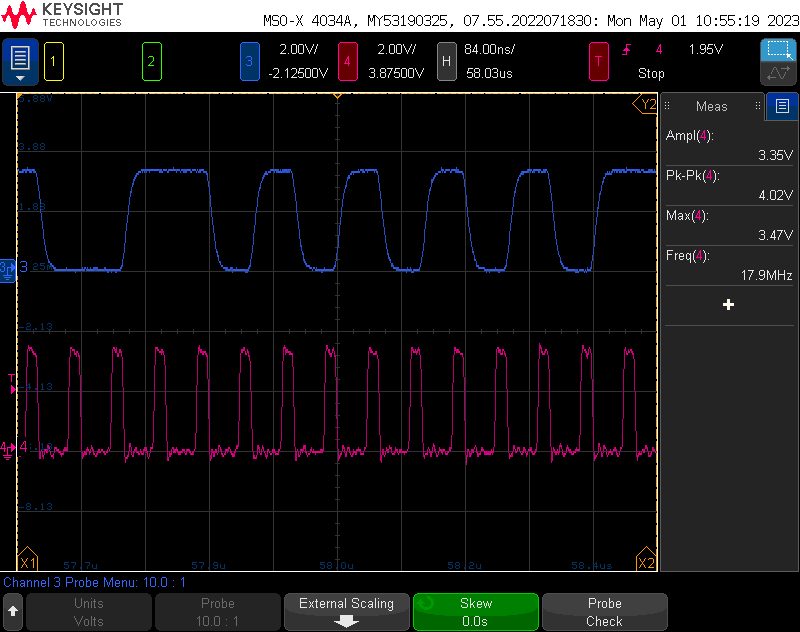
The output stability was initially very bad. This is because the sampling was running very slowly- even running on its own core, reading/writing GPIOs and evaluating expressions takes a lot of time- here you can see the clock rate into the ADC was only 6.7kHz- much lower than the minimum 5 MHz. To put it in perspective, the raspberry pi is only running 6x faster than the max speed that that the adc can be sampled. The slowest sample speed would allow 25 instructions per- reading, including whatever is needed to generate the PWM.
Even at high speeds, it takes a lot of time to get a good sample. Since the output is a bit at a time, each bit only carries one bit of information- this sounds obvious but that means that to get a typical 8 bit resolution, we don’t need to sample 8 bits, we need to sample 256 bits. even running at 20MHz, that still means only one reading every 12.8 microseconds, and that would give worse than 1 volt resolution.
In theory, with proper filtering (which I’m not doing), the adc can provide 16 bit resolution, which is incredible. I decided to settle for taking 12 bits of samples and decimating them, running at about 18 MHz for about a 200 microsecond conversion time (plus some small overhead).
This required using the PIO of the RP2040. PIO is super cool- its like a teeny tiny extra microcontroller that gets run with a tiny(!!!) 9 instruction set. This instruction set is extremely limited- even more so than typical assembly. For example, you can do something like load a number into a 32 bit register, but you cant load a number that is bigger than 31. There is no automatic incrementing of registers, but you can decrement some registers using the jump command. Its a beautiful, but strangely functional (and very fast) mess.
Basically what my code does is load a counter into the y register of how many pwm cycles to do, and loads the maximum number into the x register – 0xFFFFFFFF. Then it starts clocking out pwm cycles, and uses the jump instruction to decrement the x register and y register. When the y register is empty, it reports the x register back to the main program and restarts.
With a little math, this results in how many “high” bits there were in the data. This duty cycle is related back to the read voltage through some simple math from the AMC3306 datasheet and the resistor divider information. This tended to read really high at low voltages (20V when the output was shorted), so I added a correction/adjustment factor to bring it back in line with reality.
Output Stability:
I wanted to get a very rough idea of the output stability. It’s not easy to to claim any kind of stability or even claim a power output without a variable load of some kind, but I wanted to at least be able to set an output voltage and look at how the supply can regulate against the internal bleeder resistors.
Overall its not too bad- the max is within a volt of the setpoint, and the ripple seems to be about 10V, although given the resolution when zoomed out this far on the scope I am not totally confident in that. Given the hackery and amount of new stuff that went into this, I am satisfied with the outcome.
What I would change:
In the scheme of things, this project went pretty well- I tried at least four or five new processes, so anything working at all is a small miracle. However, there are a couple things I would change if I did it again. Here is a very public bug/ wishlist:
Indicators for hazardous voltage presence, CHARGE and nDone would be neat and blinky. Its nice to have activity indicators. I could actually add most of these with some rework, but it would have been smart to put them on the board!
I do have provisions to add an I2C screen, but no real plans to use it at the moment. This is another nice to have, to get feedback instead of using the console or a dmm, which is limiting. Originally I didn’t expect to use the feedback delta sigma modulator, so this information would not have existed in the system. Now that I have it, it seems silly not to display output voltage.
Increasing the allowable output voltage would also be easy with a substitution of output diode and output caps. It would be wise to choose output caps well in excess of the possible output voltage- even at the expense of space. Currently, my power supply can be commanded (accidentally) to self destruct!
Obviously it would also be great to go back and add the right parts for all the r’s and c’s that are bodged in.
Fix the feedback divider for better range!
PIO errata:
side loading is awesome! it basically allows you a free instruction to set output pins while you do other stuff. The “other stuff” I am doing is nopping, but this could be super useful.
labels at the end of your code will get optimized out. even if they have a nop()[x] after them. however, a regular nop() will keep them in the code.
adc pins used in the pio need to be explicitly enabled in the way you want, e.g. pin = Pin(28, Pin.IN) or pin = Pin(28, Pin.OUT). The PIO state machine class will not do this for you.
A few years ago my friend introduced me to a tasty and edible berry while we were on a hike up mount Washington. I had no idea what it was, and much later I learned that they were lingonberries, which are related to a lot of other shrubby berry plants like blueberries.
Recently I learned that plants are very sneaky and do not always come from seeds. In fact, most plant cells seem to be totipotent (capable of creating any other kind of plant cell) and capable of creating undifferentiated cell mass (callus culture) if you feed them the right stuff. I had previously considered a plant (particularly woody plants like trees) to be single monolithic organisms with parts that fall off that are dead/not useful. It seems like it is more the case that any part of a plant can turn into another copy of the plant, under the right conditions. Think about that next time you are looking at cabbages in the supermarket.
It turns out that most ornamental plants, and many commercial plants are grown not from seed, but basically from cuttings that are carefully grown in lab conditions to maximize growth and multiplication of the plants. This is called micropropogation, and its useful for getting (usually) genetically identical copies of plants. This is helpful for preserving desirable mutations.
You can probably see where this is going: tasty plant + new technique = a small project that will likely take many years to complete. I want to grow our local variety of lingonberries!
Media Prep:
these blueberries were growing right on top of the lingonberries!
After weighing my options on media I decided to go with a media that was actually recommended for blueberry bush micropropagation from “Plants From Test Tubes: An Introduction to Micropropagation”. While there was more specific media recommended in some papers on propagation, it was not clear to me (as a neophyte) that “modified ms media” was actually a specific modification of MS media, not MS+2ip. It was possible to have ordered that media, but a lot of items were backordered for months, so I ended up with regular MS media, and 2ip. At this point it was too late to get the specific modified MS, and blueberries and lingonberry plants grow right next to each other in the wild, so it seemed like it might work.
The media I made was not exactly per the book either, since I think my MS mix already had inositol. The final mix for initiation media was:
1L distilled water
2.3 g MS basal media
5ml 2ip @ 1mg/L (roughly .25 umolar)
20 g sucrose (refined white sugar)
6 g agar
The 2ip concentration was in line with what I had read was ideal for initiation from Jakkola et al. 2001, which was encouraging. The media was not checked for pH since I didnt have a meter or strips, but I would have liked to adjust it down to 4.8, which is a reasonable pH for a lingonberry plant.
One nice thing about this media is that it does not seem particularly rich (surprising given the sugars). I intentionally exposed a plate to contaminate it and it took weeks for some mold to show up. With LB, I would have expected it to be disgusting almost immediately.
Explant Collection:
Explants were collected from a population near the alpine garden trail on mount Washington. only a few grams of plants material was collected over about a hundred yards of trail, in order to minimize impact on the environment. Explants were stored in sterilized falcon tubes for transportation.
Explant Preparation and Plating:
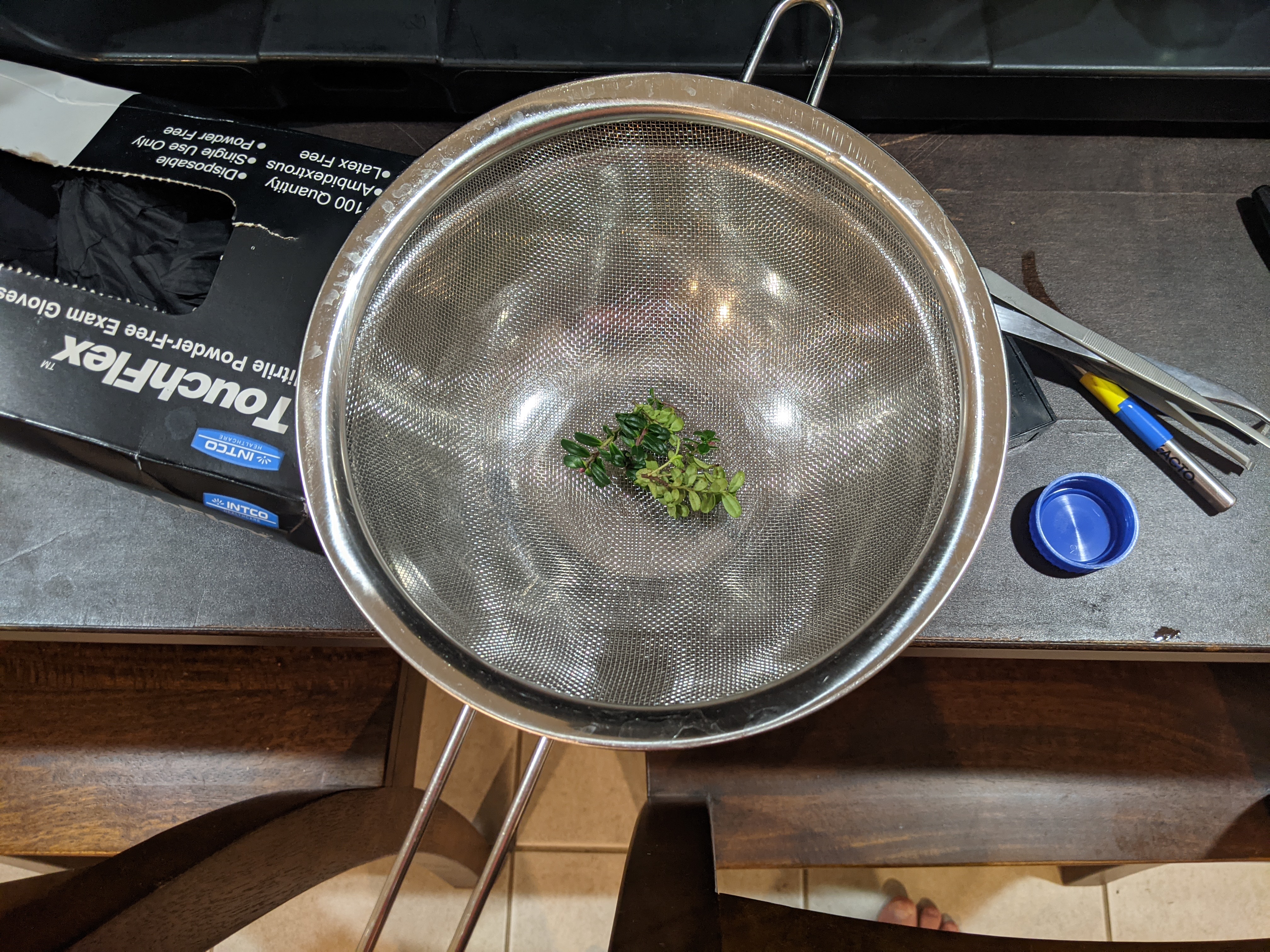
Explants were placed under running water in a strainer with a bowl beneath it in order to create an agitated water bath. The plant tissue was washed for 10 minutes under running water to remove dirt. explant material was then sterilized in 70% IPA for 30s, and then washed in 1:10 bleach solution for 25 minutes. a drop of dawn soap was added to the bleach as a surfactant. After sterilization, the plants were washed three times in sterilized water.
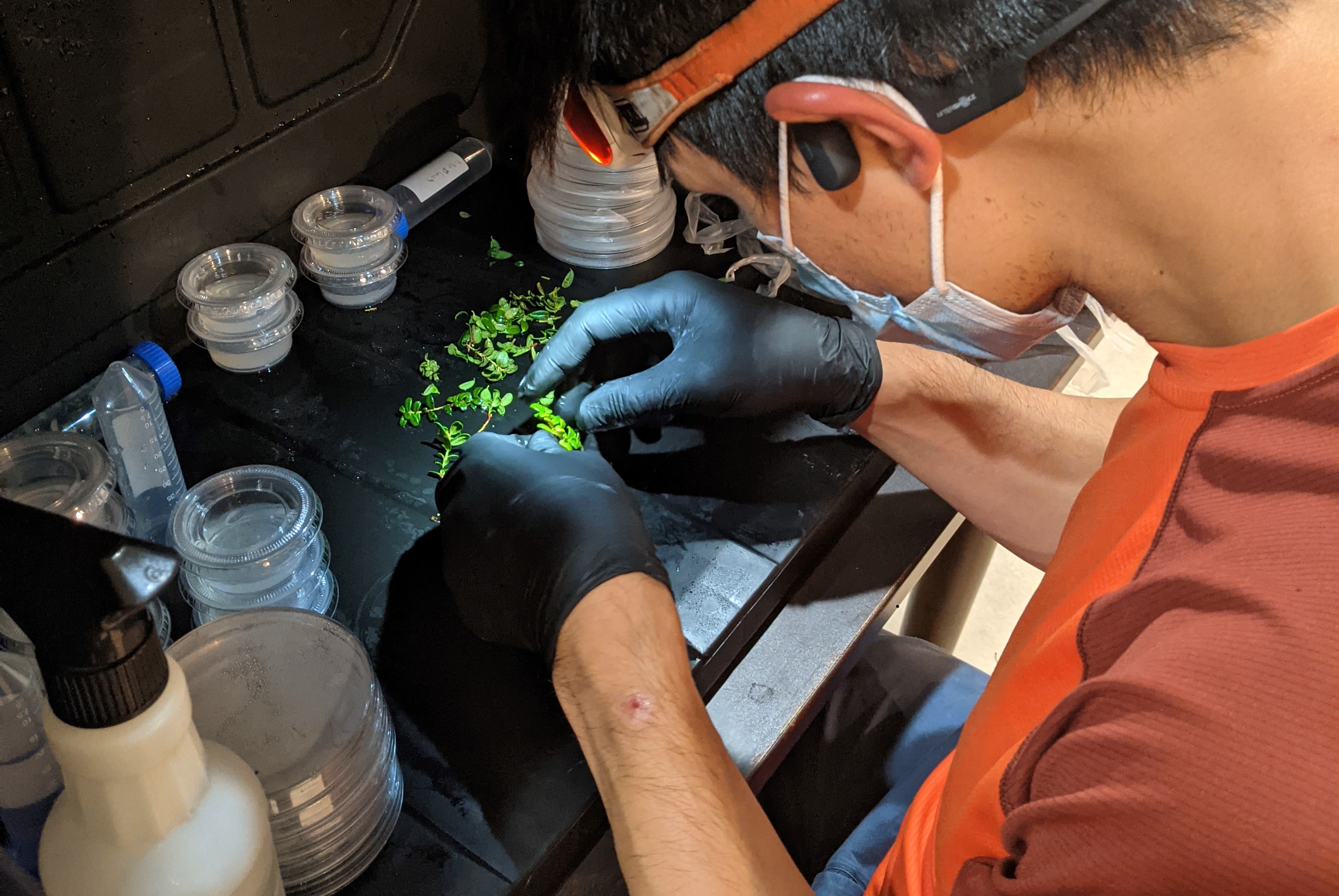
Plants were handled inside of a plastic bin that was sprayed regularly with bleach solution. Tools were sterilized/stored in bleach as well in between uses. I would recommend a clear bin for better lighting. It was challenging to cut the plants in a dark box, but after roughly three weeks, there was only one obviously contaminated sample.
Results
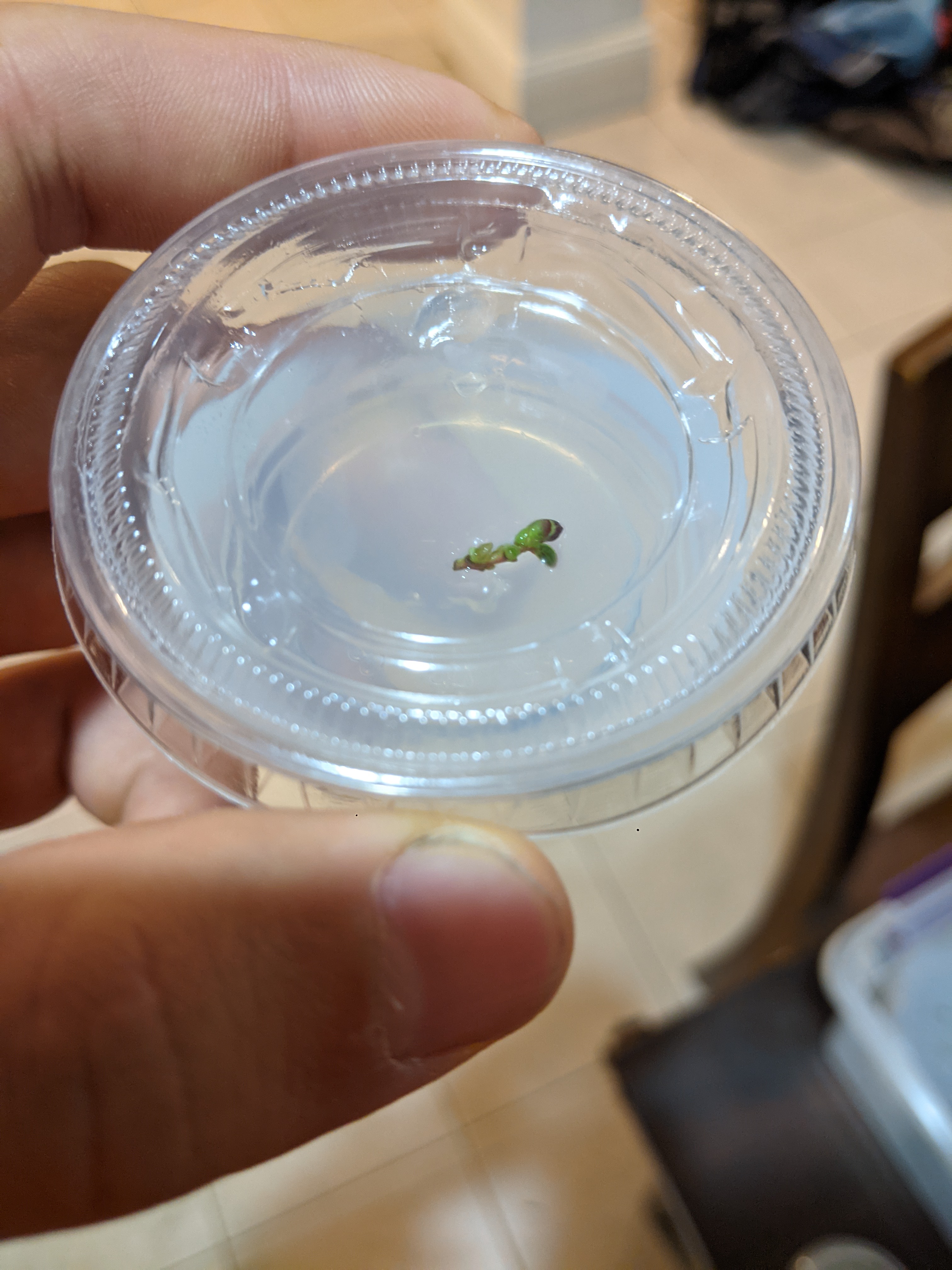
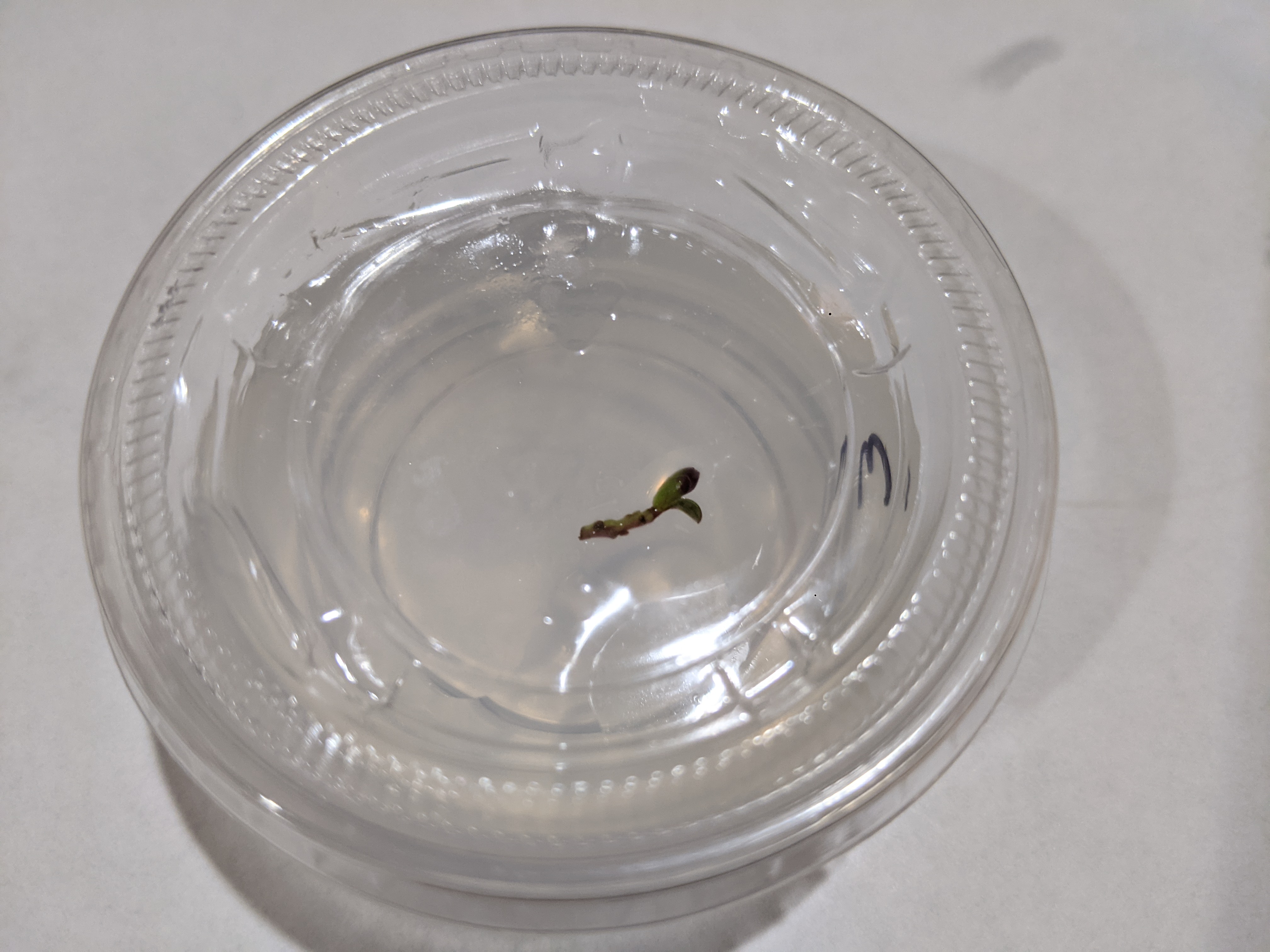
I’d like to call this section something more optimistic, like “success”, but I never really got anything to root. However, there was evidence that the media is sufficient to support the plants. In the photos above, the left photo (with new leaves) was grown from the small browned sprig on in the right photo. The right photo was taken on October 5, and the photo on the left was taken on the 19th, two weeks later. New leaves are clearly visible, and it seems like the plant is producing chlorophyll.
I’m not sure if this is strictly useful, but the lack of contamination and the plant being alive is a good first step.
A usb-pd that nobody wanted or asked for. However, I needed one.
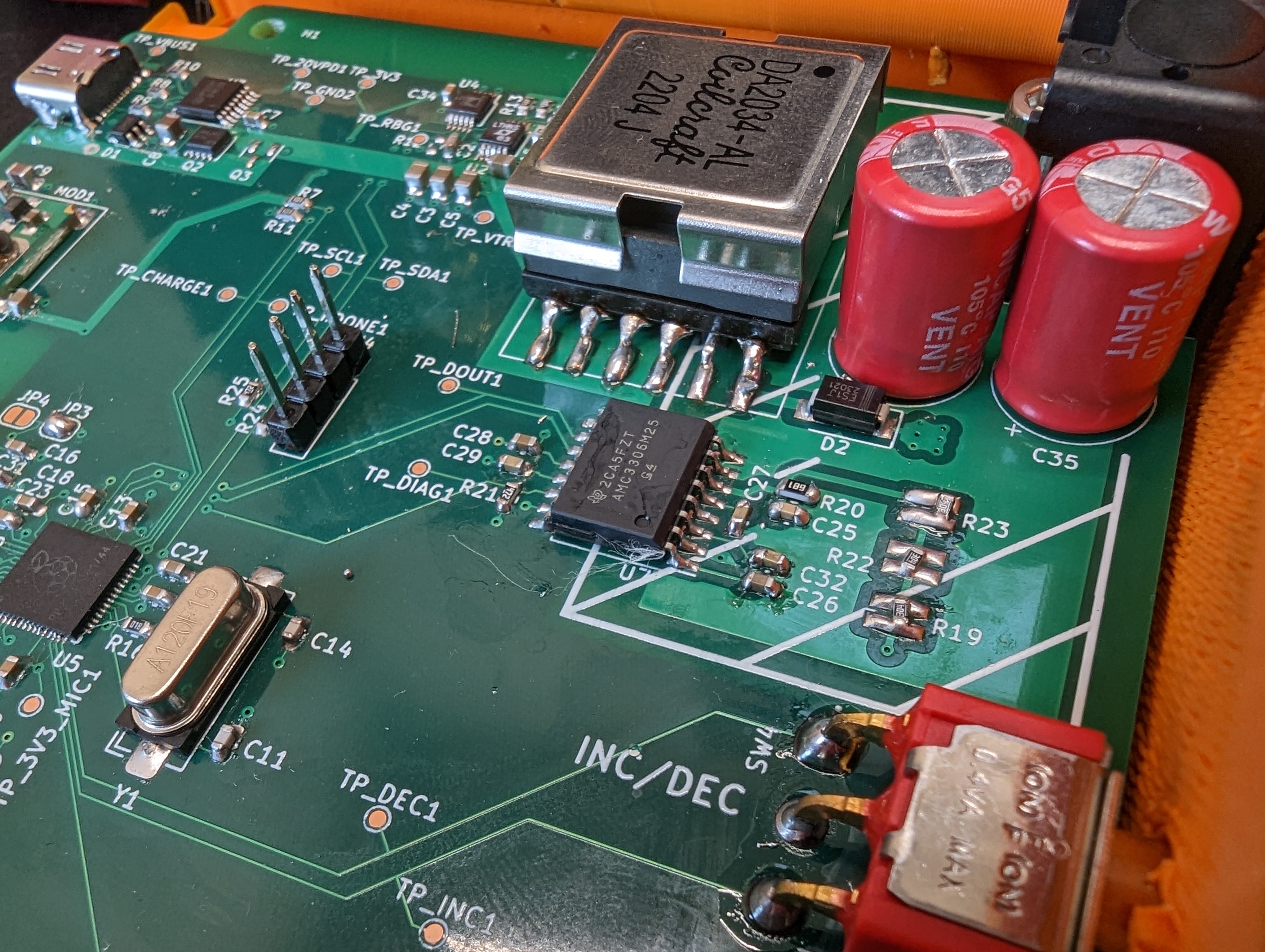
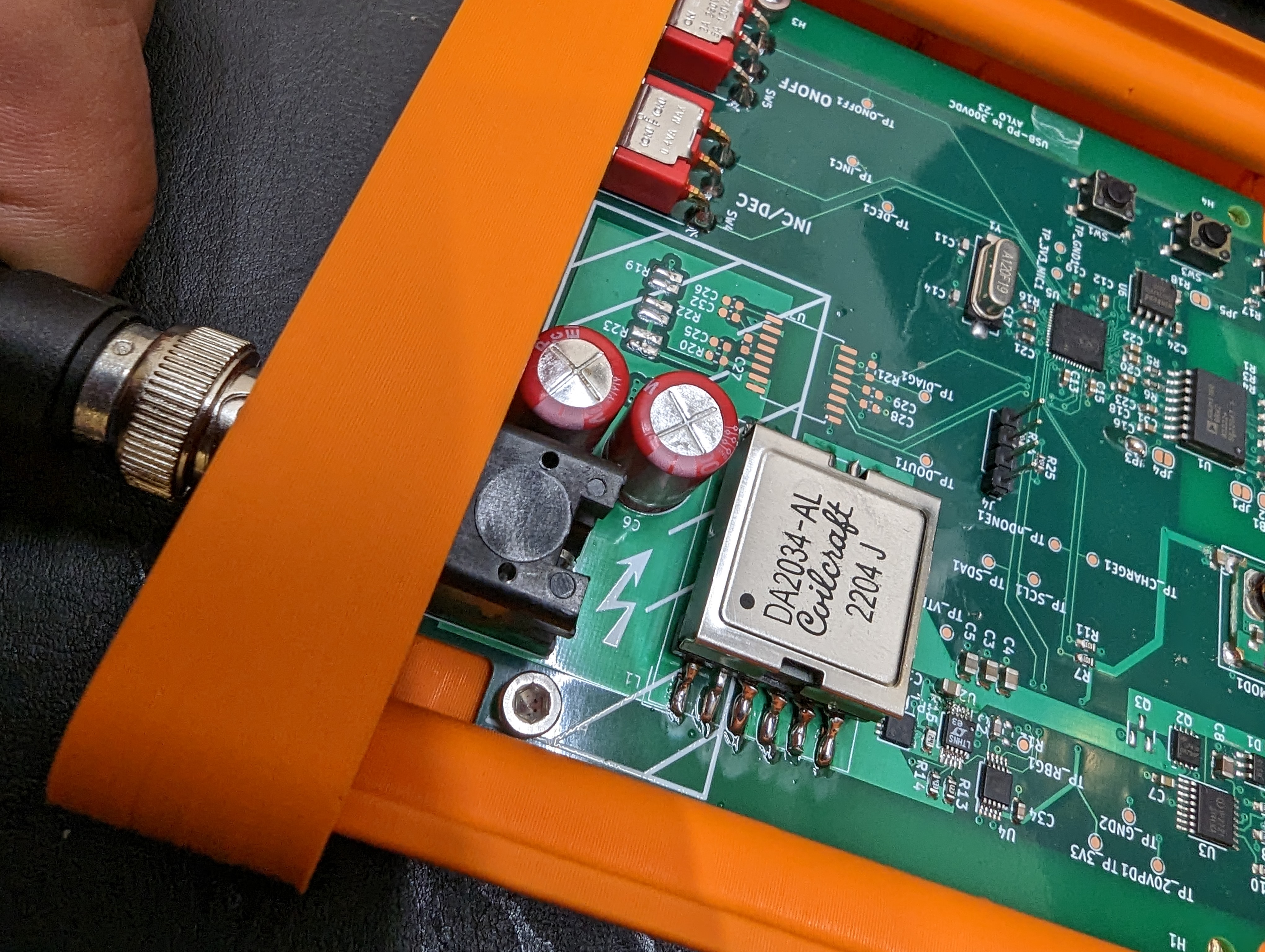
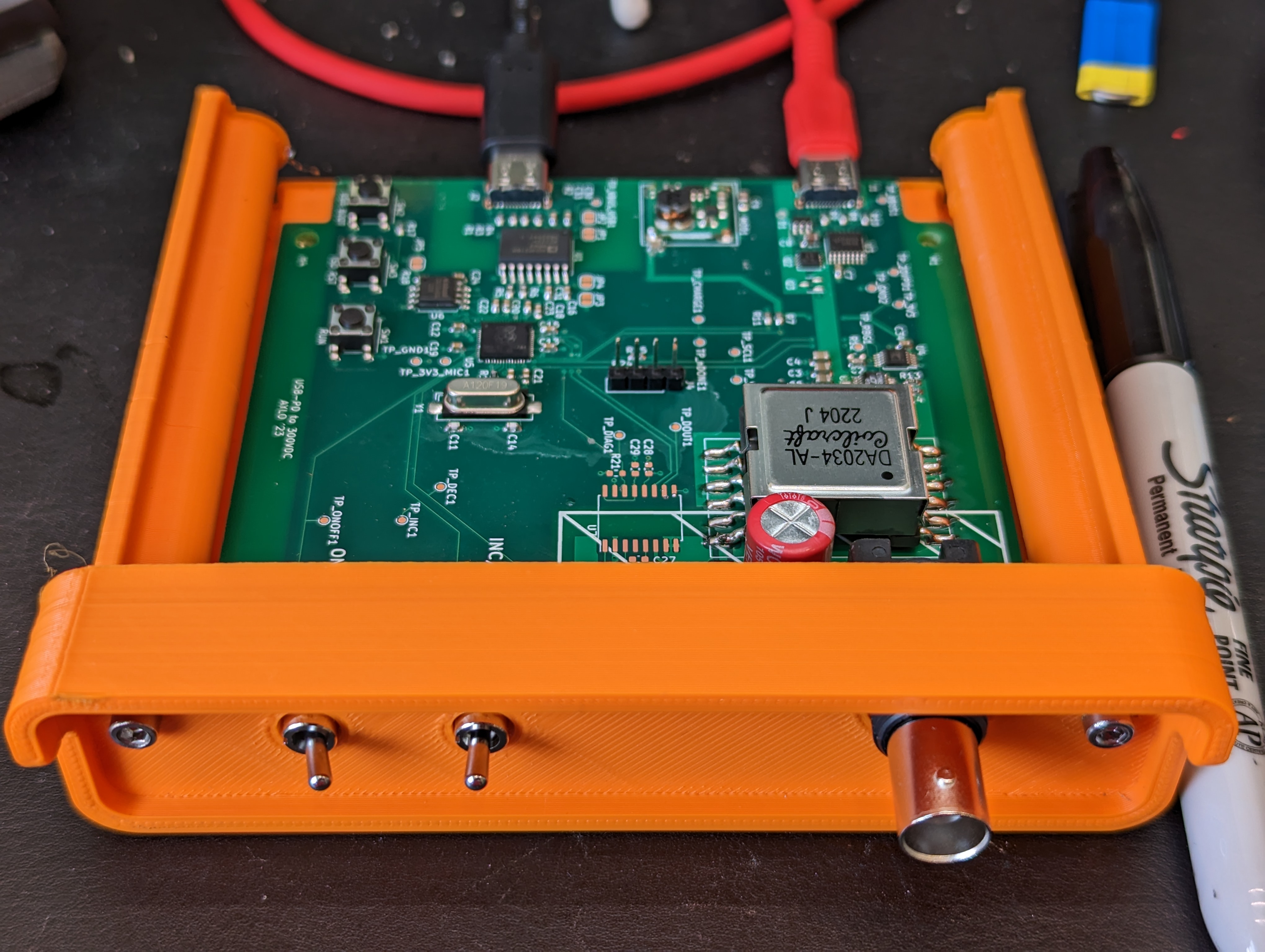
When I say high voltage, I don’t mean 20V, I mean around 300V, for high-voltage DC needs like electrophoresis or electrowetting. This is a gratuitous and impractical project, since you can buy an electrophoresis power supply for about $100. However, I wanted to do a more compilated design, and I “needed” a test PCB for my hotplate, so I made this.
The goal of this project was to make something worthy of being a lab instrument, e.g. not completely unsafe, and not held together with string and gum. I want to “have it all” with this instrument and even more than that I wanted an excuse to use a lot of new parts and tools.
With respect to safety, I wanted to essentially live up to a standard of a double insulated tool- that anything conductive sticking out of the case (unless it is live) has double or reinforced insulation. To avoid USB ground loops or accidental ground-referencing due to an evil USB port (or a short of shield to ground), all USB ports are isolated from each other and from the high voltage.
In short, in addition to this project being impractical, its also somewhat risky in terms of project bringup- it was possible I missed something or that a circuit just won’t work and would be impossible to fix.
High Voltage Generation
Ignore the loose solder blobs…those got cleaned off.
I wanted to use a flyback converter to take advantage of the inherent isolation of the transformer. The 300V out is not ground referenced, which makes it a lot safer since you have to touch both wires to get zapped (this will hurt). To maintain isolation, the output voltage cannot be sensed directly (with a conductor). One option is to use an opto isolator, but that requires more board area, cost, and things that can go wrong.
Another option is to use a flyback controller with “PSR”. PSR is primary side regulation, which senses the voltage induced on the primary while the secondary coil is discharging. This cleverly uses the transformer itself to avoid extra parts or breaching the isolation. There are a few controllers with this feature.
I also wanted the flyback to be adjustable- this is not as easy since it seems like these controllers are most often used when “just one” voltage is needed over and over again (many are for charging photoflash capacitors). The trick was finding one where only one resistor value needed to be changed, which I could do using a digipot.
I landed on the LT3750, which checks all the boxes. An additional factor was that coilcraft sells a special inductor that plays nicely with this controller, and for my application which has very high primary side currents (low DCR), low leakage inductance, and needs a relatively high inductance to be slow enough for the controller.
For safety, I added a high value bleeder resistor to the output caps, so they will discharge below the hazardous voltage threshold within a minute or two of disabling the supply.
N.B.: I later figured out that choosing a controller without continuous feedback was a problem- I made it work but its not ideal, see what went wrong.
USB Isolation
This device has three ports- two USB and one BNC. It’s important to prevent any conduction from one port to another, to avoid ground loops or ground referencing. The power USB port is isolated from the high voltage by nature of the converter. The data usb port (also for programming the RP2040) also needs to be isolated from the power USB port.
To do this I used an ADUM3160 which is a full speed, reinforced isolator. this provides a great deal of protection from voltages on either side of the isolator, which is important to protect both myself and my computer!
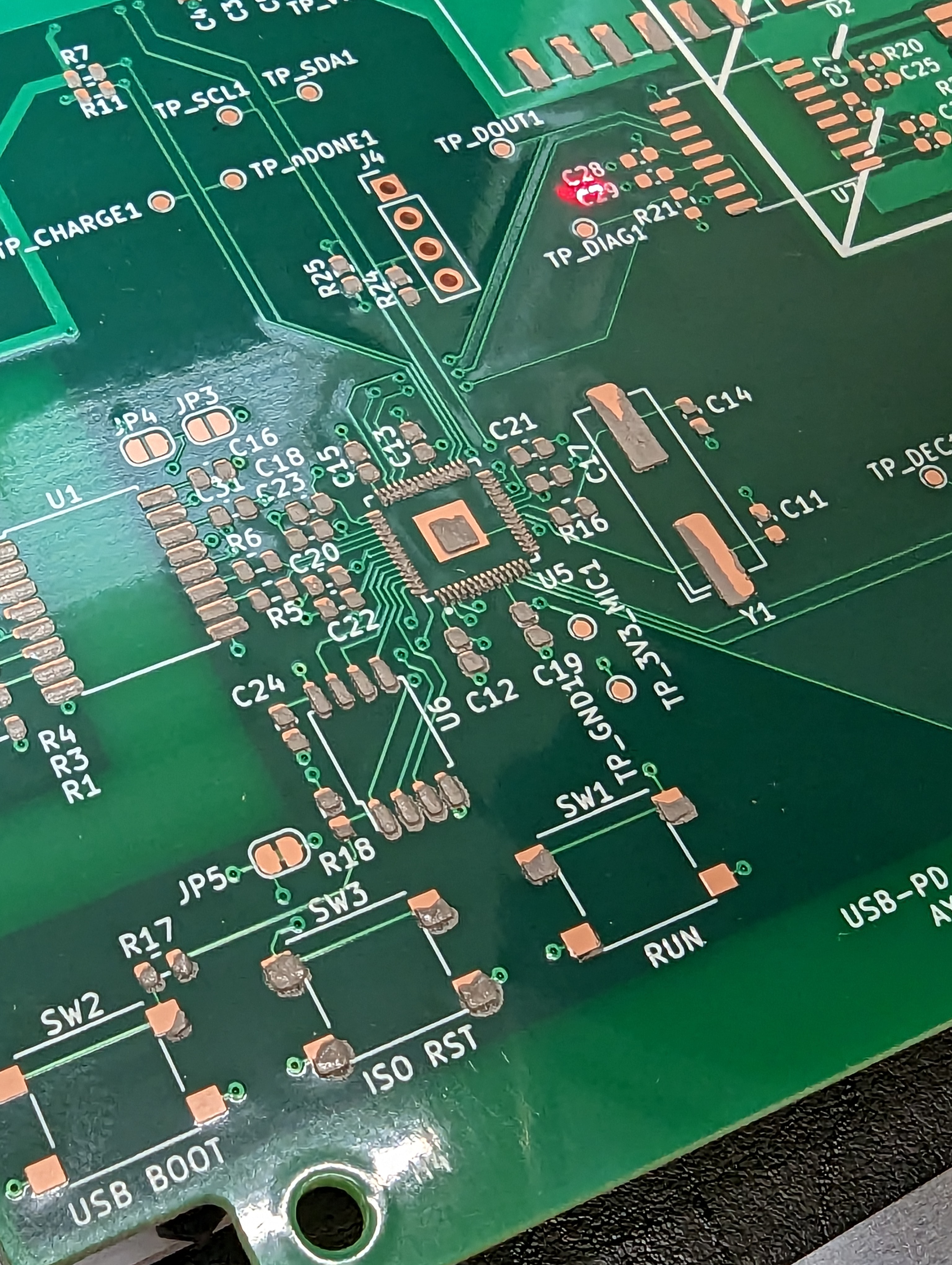
This worked off the bat at full speed, with little care given to the trace lengths/impendence ,since I kept them short. Surprisingly, the main design issue in the whole project was using the wrong jumper footprint, which left the device speed undefined on the rp2040 side. a single blob of solder fixed this (shown above).
RP2040
At the heart of this all is an RP2040. I’ve never used one of these (or micropython) but they have a pretty good hardware design guide and it looked simple enough to one-shot the design. Surprisingly, soldering the QFN went smoothly, and the usb bootloader worked flawlessly, which is an unusual and totally delightful experience.
Bringup with the RP2040 has been similarly delightful- using the REPL, its easy to query devices over I2C and to make sure that all my buttons etc. are hooked up correctly in only a few minutes. It was also easy to write scripts to quickly test the power supply. I can see a lot of reasons to use this in the future.
What Went Wrong + The RP2040 is a Hammer
The LT3750 has PSR, but no feedback about what the voltage is unless it is charging. This means that if it is charging, it is regulating the voltage, and if it is not charging, it has no idea what the output voltage is. Checking what the output voltage is can only be done by pumping a little energy into the output and seeing what happens, which increases the output voltage (if done frequently).
Days since magic smoke released: 0
To maintain the output voltage for different loads, the output needs to be checked frequently. This checking can easily drive the output voltage up (based on the minimum resistor value, to about 600V), which is enough to blow up the output caps, fry whatever thing you were running off the power supply etc. – in short, its nasty.
If not checked frequently enough, the output voltage will sag under different loads. What works for maintaining voltage across the bleeder resistors might not work for a real load.
Fortunately, I had planned to use the AMC3336-Q1 to measure the output across the isolation barrier. This part is super convenient to use because it is powered from the isolated side through some integral magnetics. This eliminates needing to do funny business to get a low voltage source referenced to the high voltage side.
Sadly the AMC3336 was out of stock, so I ended up with the AMC3306m25. This is the same part, but it only has a 250mV range, which is ok because that only required a small change in the resistor divider.
By using the AMC33X6, I can measure the output and kick on the converter if the output drops from within a few volts of my specified output.
One annoying thing about the AMC33X6 series is that the output is fairly high frequency digital output. The output is basically is a 5-20Mhz square wave that needs to be measured synchronously with a CLKIN signal that also needs to be generated (at least on my board) by the micro. The digital output actually encodes raw ADC information in terms of duty cycle. The proper way to process this is with a digital filter (and who knows- maybe I’ll do that) but currently I am just decimating (averaging) it.
If this sounds like a job for some low level micro peripherals, you are right. Or if you think this is the perfect application for the raspberry pi PIO, you would also be very right. However, the rp2040 also has an entire 125MHz core that I wasn’t using, so instead of doing it the hard way, I did it the easy way and used the second processor to generate the clock signal and to read/process the data in.
This works reasonably well, and I’m ready to start developing the rest of the application for which I need this high voltage supply.
Source
If you are interested in any of the specifics of this project, you can get the source here.
My hotplate, while very functional, was not user friendly. It was a small matter of software (SMOP) to solve these issues.
The buttons work!
The hotplate can be turned on and off and controlled in increments of 10c using just the buttons. This frees it from needing to be hooked up to the computer with another USB cable. I originally imagined that having computer control would be neat (and it would be), but its not really necessary for anything that I am doing right now, and it impedes my workflow to do so.
There is a screen!
This screen really would be better off rotated 90 degrees. the final hotplate controller will have that, but for now I will just have to use my imagination. This screen is at a funny angle because the original plan was to control this through the serial port and specifically not to have a screen.
To Do:
This thing needs some kind of case, both to protect the electronics and to make it easy to use and store. I will probably 3d print some kind of temporary mounting arrangement, and also spin up a finished version of the user interface. That UI will probably get assembled on the hotplate!
With my pcb hotplate built, I needed a test for my new tool. My goal is to be able to easily do prototypes of pretty much anything in-house, to avoid the delay, cost, and general PITA of outsourcing board fab. I also want to switch to a lead-free process.
Motivation to go Lead-Free
There are a couple of advantages I see with moving to lead-free SnBiAg solders, especially at home. The first is that the liquidus temperature is much, much lower- around 140 C. Eutectic tin-lead solders come in around 185C, and SAC lead free solders melt around 220. This lower temperature has two pleasant benefits. First, you won’t end up scorching your parts/silkscreen/soldermask with hot air trying to get some chip off the board. Second, everything is easier/faster to heat up since less energy is required.
This lower temperature also seems like it should reduce the energy in the flux fumes, which I can only assume is better than the alternative (use a fume extractor, kids).
The other advantage is that there is no lead in lead free solder. It’s 2023- we know lead is bad. I have done a lot of soldering with lab/food separation, and while leaded solder is probably fine if you have a lab setting, its not something you want to get in your carpet/personal desk/place where you might sleep or eat. Realistically there’s always a little loose solder created when soldering (think of what is the bucket of a brass sponge).
That said, I’m keeping my tin-lead solder (for good reasons).
How Does It Compare?
A quick test- most of the paste printed well (look at C12 and C19)
One limitation is that SnBi solder can’t be used with leaded solder, since this can form a Sn-Pb-Bi alloy with a very low melting point (below 100C). And, for some reason, it does not seem to be available in small wire diameters. Hopefully this will change, since having a huge 1mm solder wire sort of prevents any kind of small SMD rework using wire.
Another limitation (as a result of not playing nice with lead) is that leaded pad finishes are inappropriate for SnBi alloys. This, combined with fine-pitch parts, lead me to use OSP. Both leaded and unleaded solder seemed to have less-good wetting on this surface than on ENIG/HASL type finishes. I think that SAC HASL is probably OK for a surface finish but I have not researched it. ENIG would have been preferable for the QFN.
It also seems to take a long time for the solder to get wicked up into solder wick, which can be frustrating. I think a larger tip would help here, but my best “normal size” tip is currently reserved for leaded soldering.
And that’s about it. Overall a good replacement, especially for prototype boards that don’t get hot!
A First Project
I wanted to really see what I could get away with, so I designed a board with a QFN, some fine pitch USB-C connectors, and a handful of of fine pitch leaded SMD components. There were also some larger parts like buttons, crystals, and a whole module, that represent “bulky” parts. To raise the stakes, I decided I would go crazy and use all kinds of $10 ICs.
To solder this, I used the chip-quick NC191LT50, which is a paste that does not need to be refrigerated. It printed nicely using a stainless stencil.
Test run showing bridged pins, some issues wetting
I then put it on the PCB hotplate and took it up to about 160C. Since this is a four layer board, it took a few seconds for the top to heat up. The soldering went surprisingly well, but the QFN had some bridged pins.
Since the solder is low temp, removing the IC was a breeze and the board stayed totally un-scorched. I quickly wiped up some of the solder, and hot-aired it back on. It is now working just fine!
Larger parts were soldered with the same alloy, but with solder wire. I only had a very small soldering iron tip to use (a non-leaded one), so it was hard to get good contact, but the solder did eventually wet everything nicely.
Overall this went shockingly smoothly, given the diversity of parts and using a while new process!
Conclusion: Tin Bismuth Silver solder is here to stay
I am pretty happy with this stuff, especially for projects where a stencil makes sense/is affordable. I’d hate to solder fine pitch components with the huge wire, but I think a paste (even from a syringe) and a hotplate will go a long way.
The hot plating continues! And with the boards actually in hand, I can compare my estimates to some real world measurements.
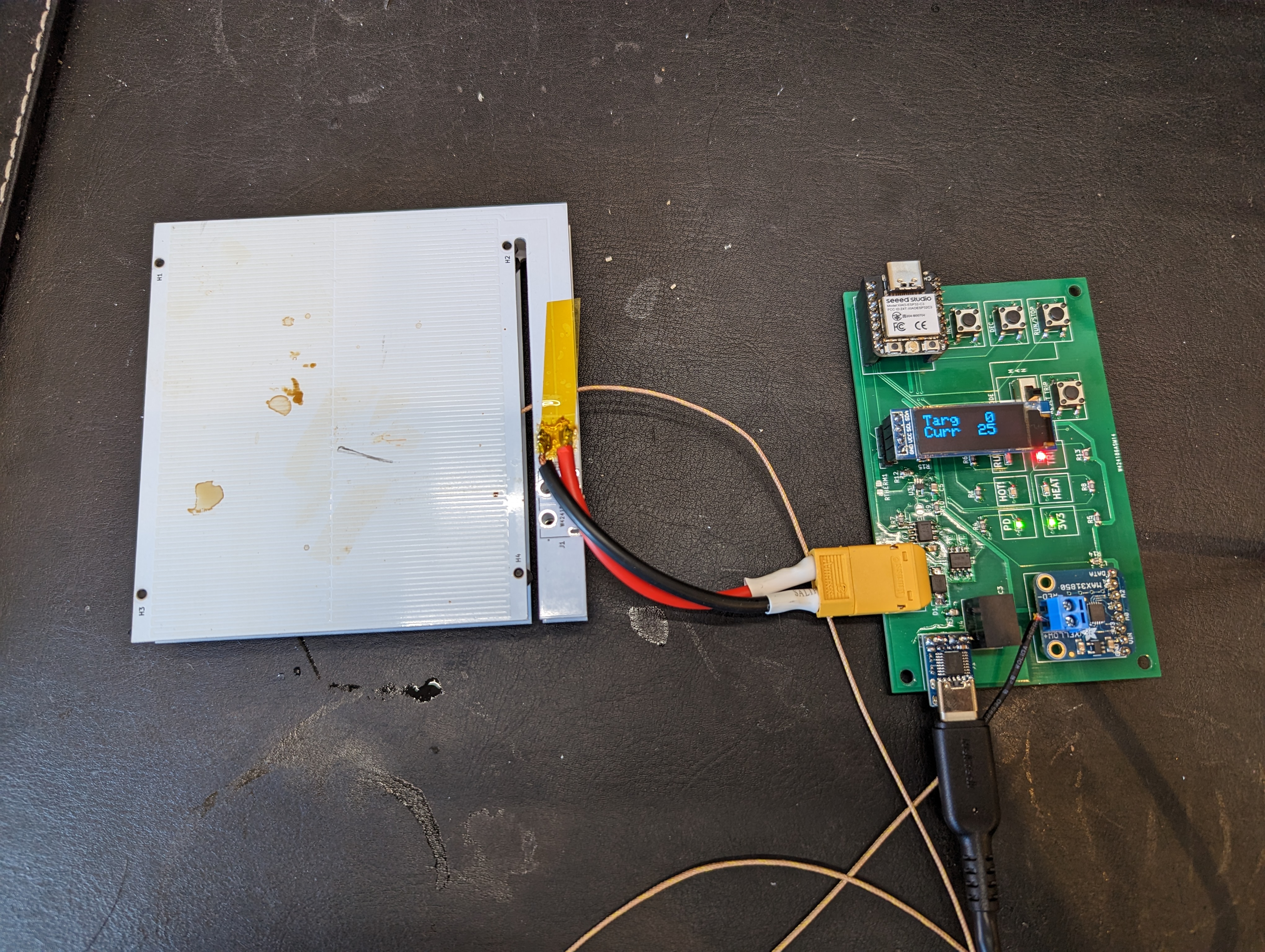
In the end, I made both FR4 and aluminum heaters. These heaters ended up having slightly different properties. Oddly, the aluminum PCB has a higher resistance (4 ohms) than the copper pcb, 2.9 ohms). Read on to figure out what this did to the design.
Designed Vs Measured Resistance:
The design resistance of the heater track was 3.3 ohms. Clearly, this was not “nailed” for either of the boards, but it was close. I was surprised that both boards didn’t overshoot the resistance, due to the addition of a few extra squares of conductor on the connector island- however the FR4 heater seems to have a more generous allotment of copper, and the aluminum PCB may have slightly less copper.
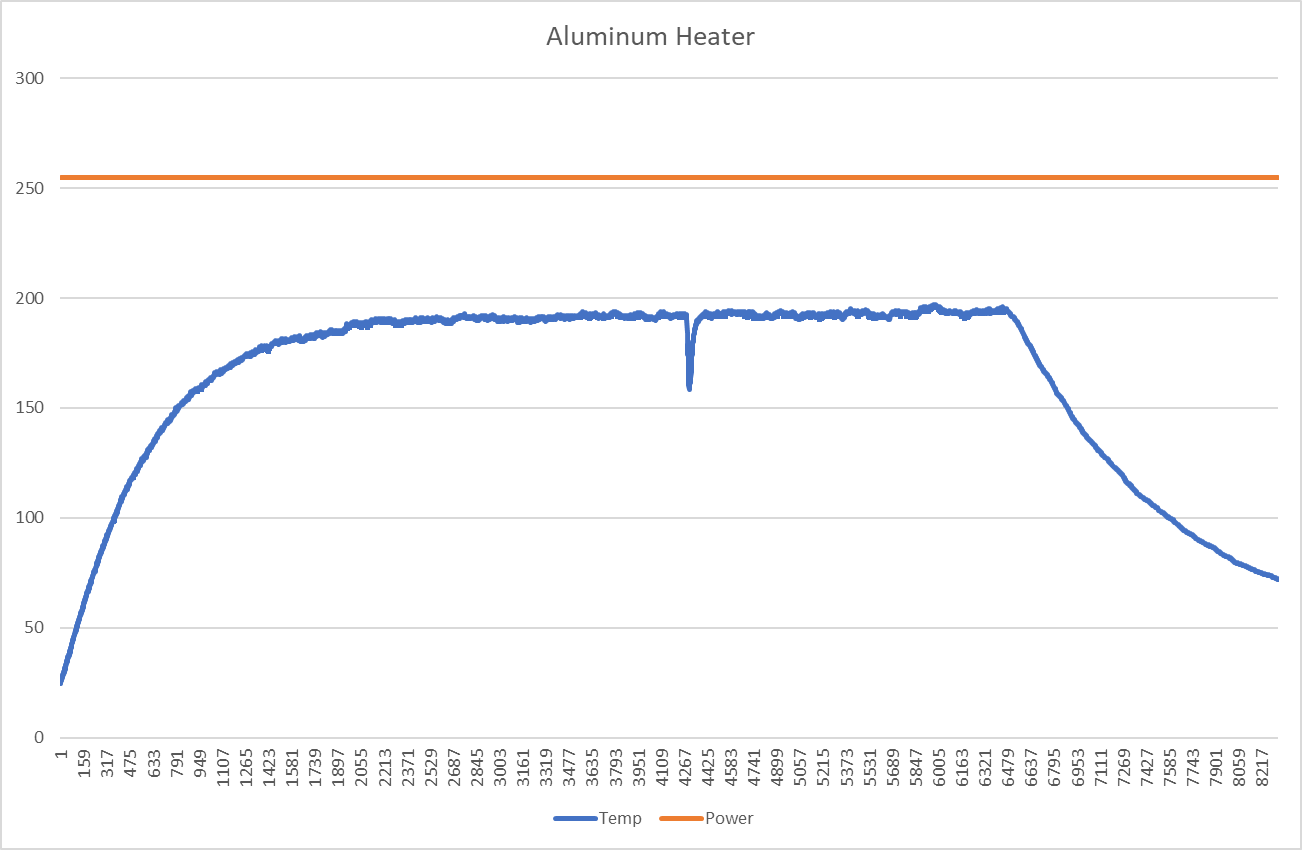
Unfortunately, this means that at higher temperatures, the power delivered to the aluminum board is much lower than desired. The calculated value for the resistance at 200C is about 6.7 ohms, and the measured value is 7-8 ohms. This means that the maximum power available at 20V is 50-60W, or less. This is pretty close to the theoretical minimum power needed to reach 200C, which is why this plate struggles to achieve 200C. As you can see, the heater is on for the entire time (until I pulled the plug). Time units are in 10ms intervals. Fortunately, this validates the power delivery assumptions I made in the past post.
To recap, Qdot is the amount of heating power needed to sustain a particular delta T, given some convection parameters. I assumed a delta T of 175k, with an area of about .01m2, and h being 25 W/m2k, resulting in a power delivery at the heater of 43W. while this is not totally spot on, its in the right ballpark. It suggests that lowering the resistance and actually delivering 100w would be very helpful to removing this 200c limit. I think 10-20 is a reasonable conservative estimate of convective cooling, but its conservative in the wrong direction if you are designing a heater.
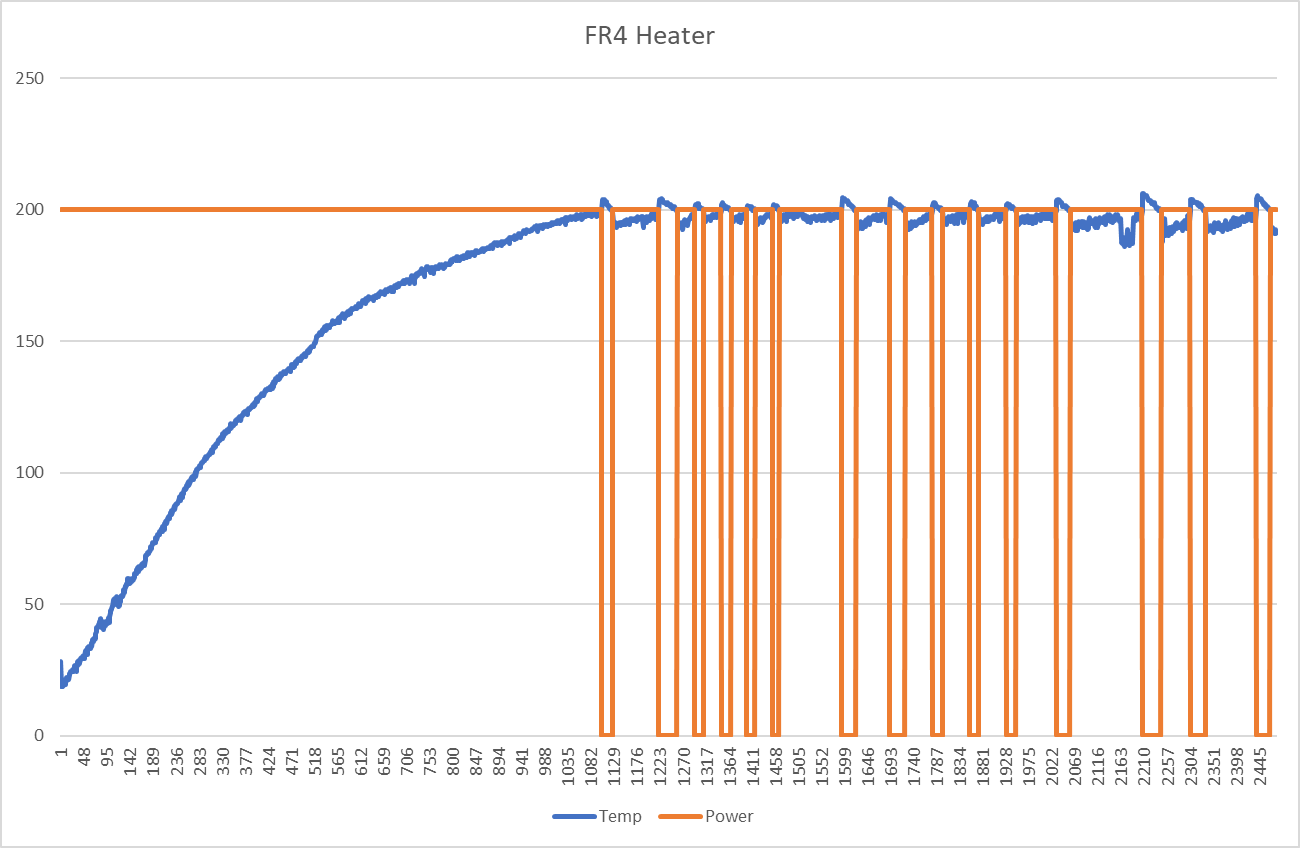
On the other hand, the resistance of the FR4 heater is low. At low temperatures, running at 100% PWM (all on), will cause the power supply to brown out. This means that the power delivery actually needs to be cut back (PWM’ed) when the heater is cooler, so that the overall current draw is lower. Once the heater is in the vicinity of 100C, it can be run “full blast”, aka more or less shorted across the power supply.
Does It Blend?
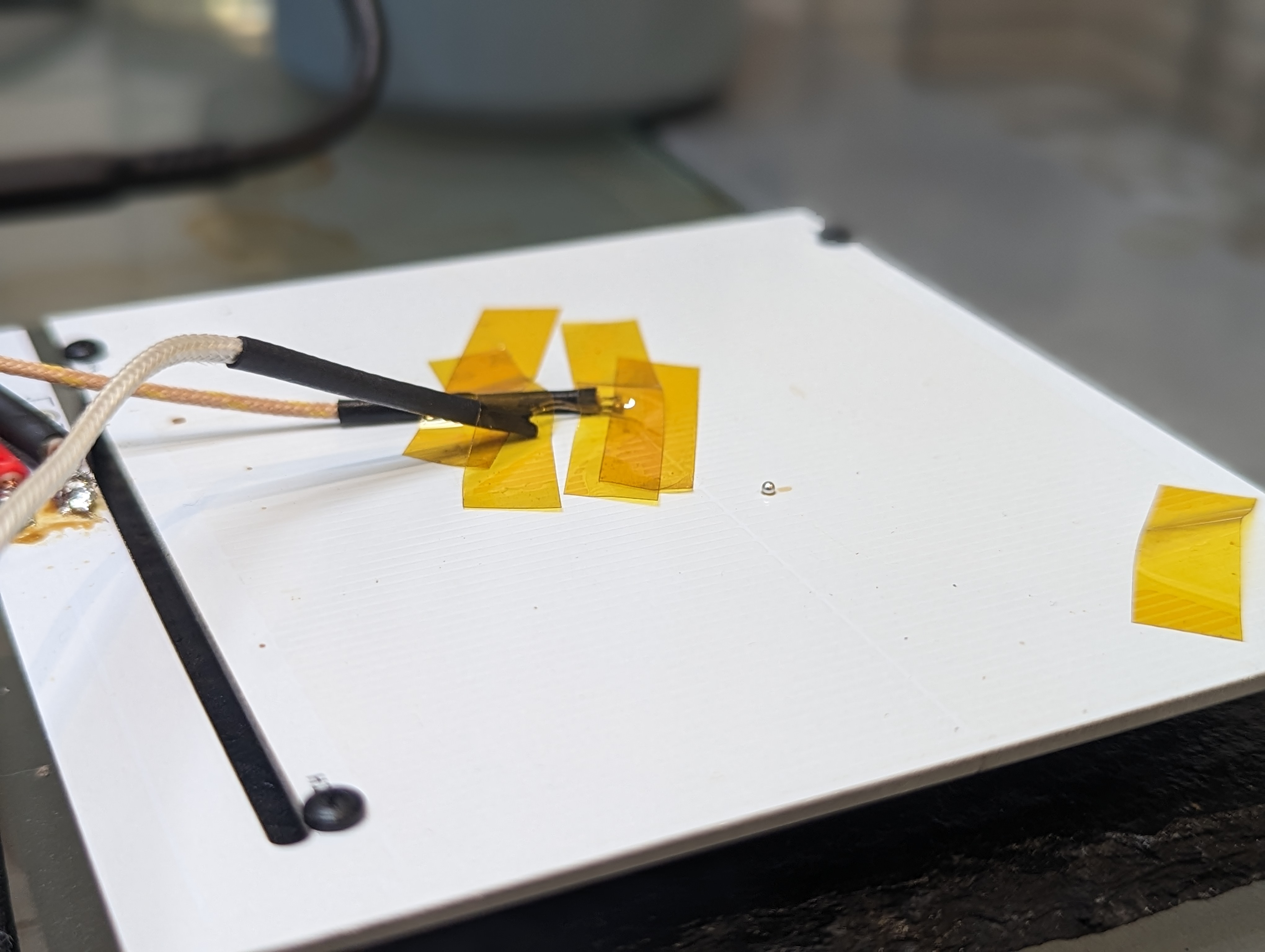
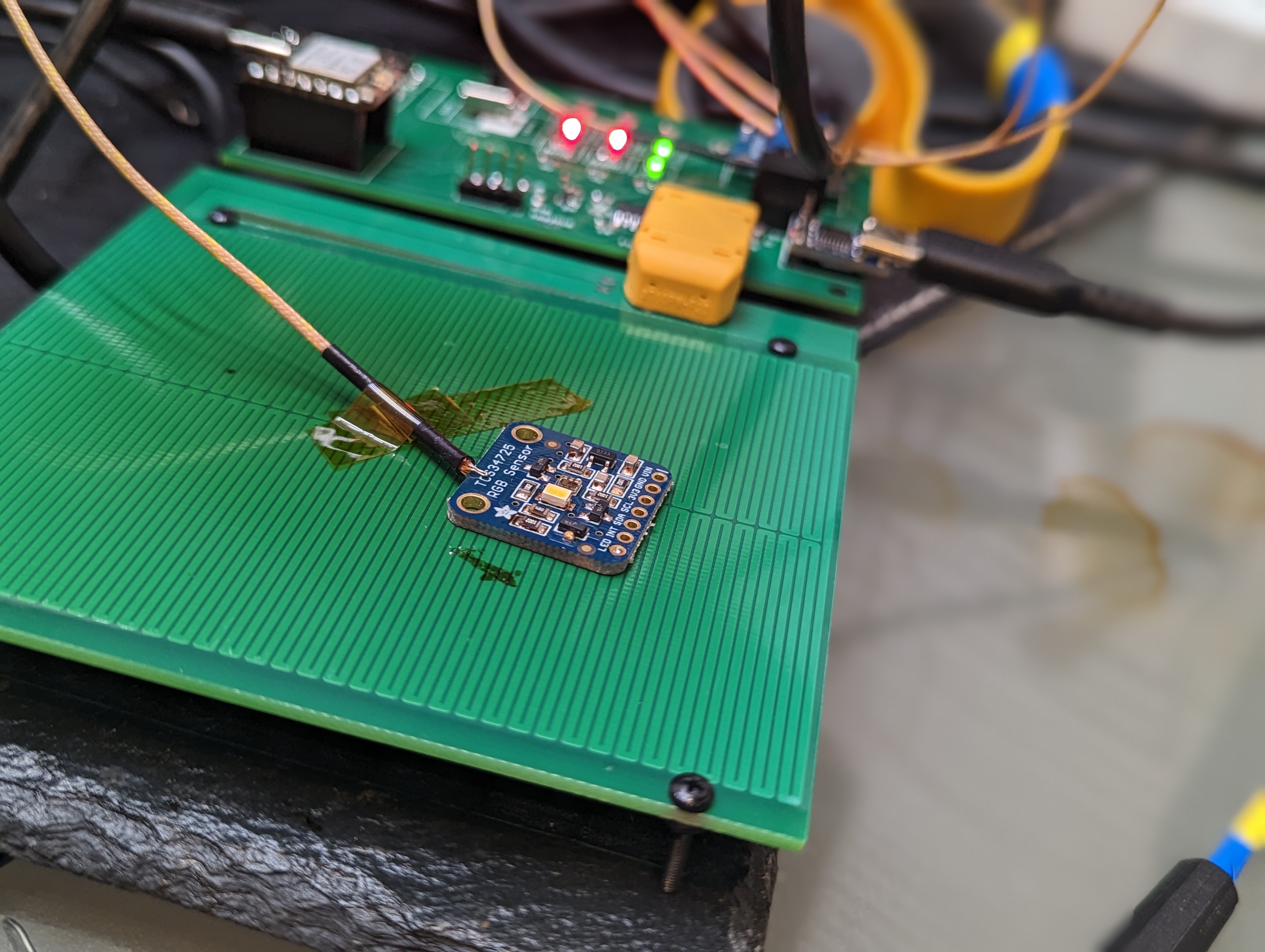
Both the aluminum and FR4 heaters were able to reach 200c depending on the conditions. Both were capable of melting solder directly on the plate, as you can see. The aluminum heater would benefit from an improved (lower resistance) heater trace.
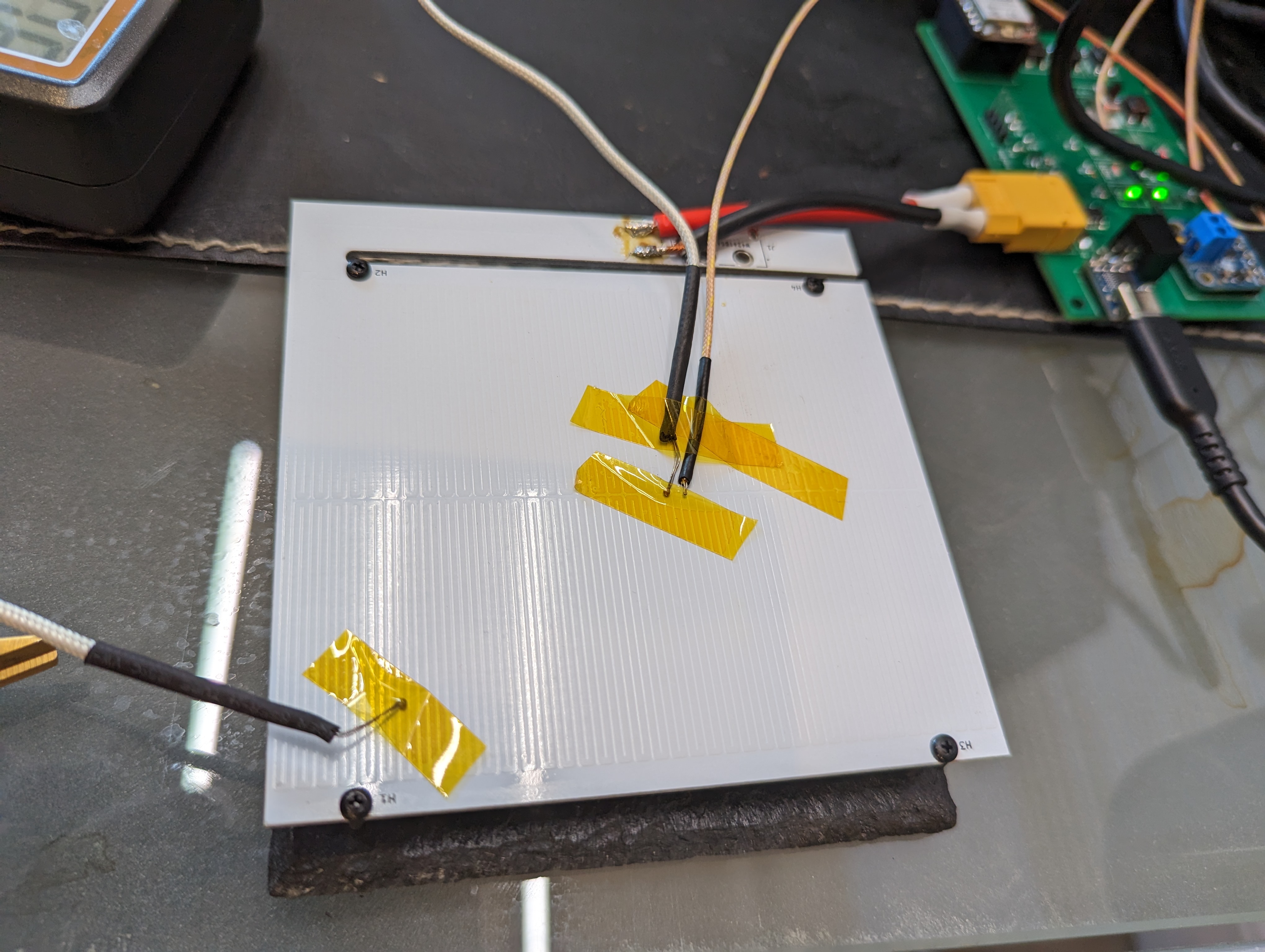
The remote probe feature allows for the sensing of the temperature of the PCB being soldered. This is good, since that is where the temperature actually matters. This can cause the heater to get much hotter (20c or so) than the top of the target board, which in this photo, resulted in some discoloration of the solder mask of the heater.
Temperature Gradients and Overheating:
The hot plate design needs to achieve two tasks: be cold at the connector (so as not to de-solder it), and it needs to be hot (and ideally, evenly hot) across the surface.
The worst case for de-soldering the connector is with the aluminum heater, since the aluminum substrate should conduct heat pretty well. Up at peak temperatures, the connector area only got to about 85C. Certainly warm, but not nearly hot enough to damage the connector.
In terms of heater gradients, the aluminum PCB had about a 10C difference from the center to the corner at 200c. The gradient to the “neck” of the connector island was much worse (13+ C), since the thick traces there (and the substrate) act like a heat sink. The corners are cooler since there is some radiation and extra convection out of the sides of the heater.
The FR4 board has a even higher gradient, in excess of 50C during heat up, and staying steady at about 50C after several minutes. This is annoying, since it makes the outer areas of the PCB too cold to solder on. The center can be overdriven to compensate, but that leads to overheating and discoloring the solder mask.
New Design Goals + Limitations:
Its clear that hot plate soldering is not the ideal way to solder- something like a toaster seems a lot better and faster, since it can more evenly heat the target PCB. The main issue is that in order to get the top of the PCB hot enough to reflow, the bottom has to be quite a bit hotter. This is worse with traditional lead-free solders, since they need to hit about 220C. Lead-Tin eutectic solders need to hit 185 or so, and bismuth lead-free solders only need to reach 140 C (there is a medium caveat here).
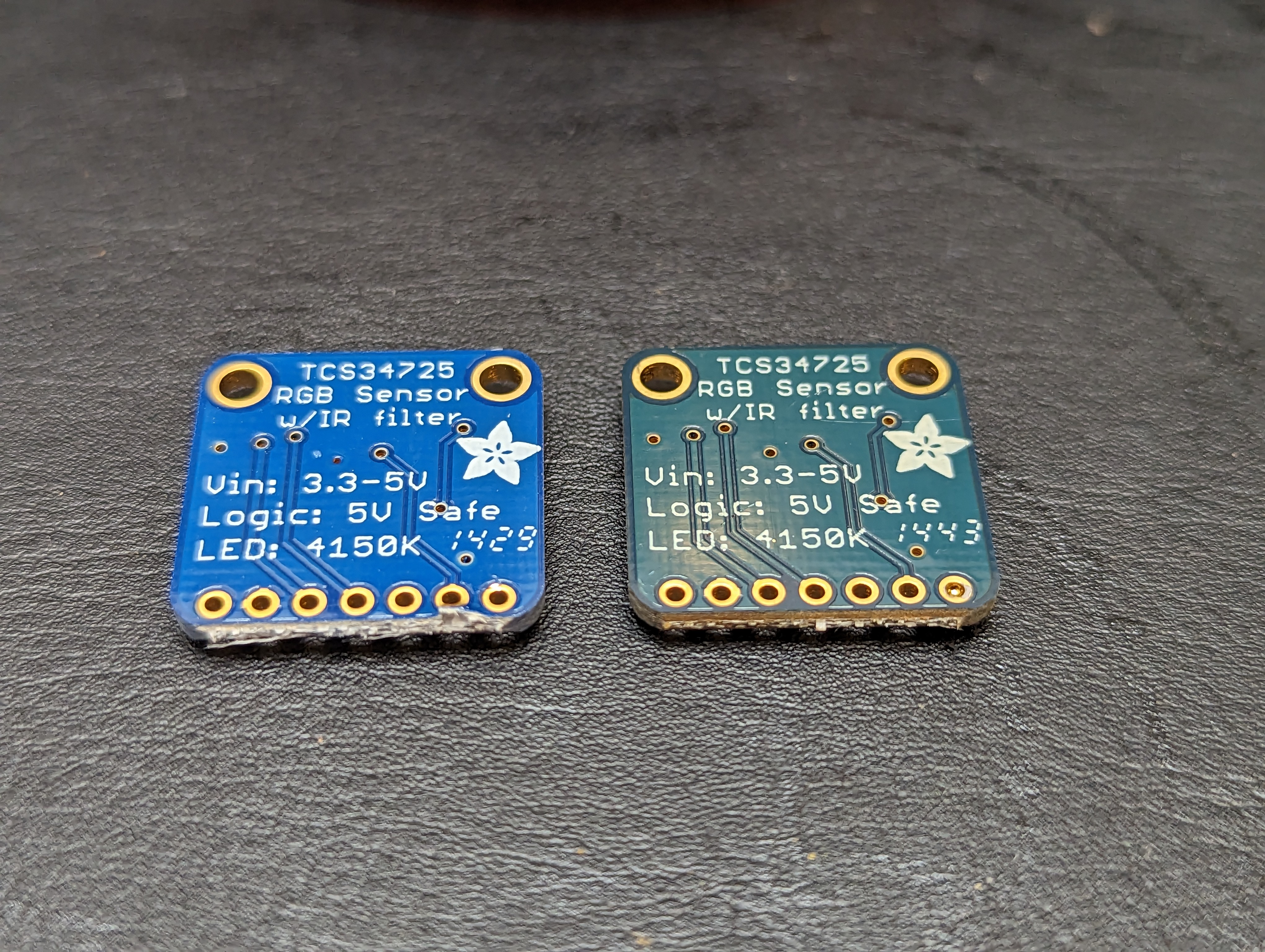
You can see the results of this heating on an adafruit board (above), that I gently reflowed. The left board is new from adafruit, and the right one is reflowed. It didn’t really damage the board, but it certainly would be an unacceptable outcome if a manufacturer overheated a board like this, and the lead free solder (I assume) on top barely reached the liquidus point, and would re-solidify as soon as I moved a component.
The medium sized caveat is that any lead in the process can poison your bismuth solders forming a bismuth-lead crystal that has a very low melting point (95C!). I think the jury is still out on using bismuth solder for stuff that gets hot, but for most prototyping it seems fine. For low temperature solders, the hotplate is fine because your whole board stays under typical soldering temperatures.
For leaded solders the hot plate will likely also work ok, since the heater can be at about 200c and the surface of the target PCB can be at 180. However, for lead-free SAC (Sn Ag Cu) alloys, I think the hot plate will likely damage the solder mask of the target PCB. However, using the PCB hotplate as a preheater could work fine, with the addition of a hot air gun assist.
I would like to use this hot plate to solder and test complete prototype designs, with packages that are hard to hand solder, particularly leadless stuff like QFNs. I find solder fumes to be irritating (and there are more at higher temperatures), and so I am going to try using the bismuth solder, at least for prototyping. For leaded work, I’m pretty sure the hot plate would work fine, and it will be a good tool (combined with hot air) for reworking SAC alloy lead-free boards. I’d also like to take up less closet space than a toaster oven, so I think the project does have some value. It also fits in nicely with the USB-C powered soldering iron ecosystem.
Electrical Stuff:
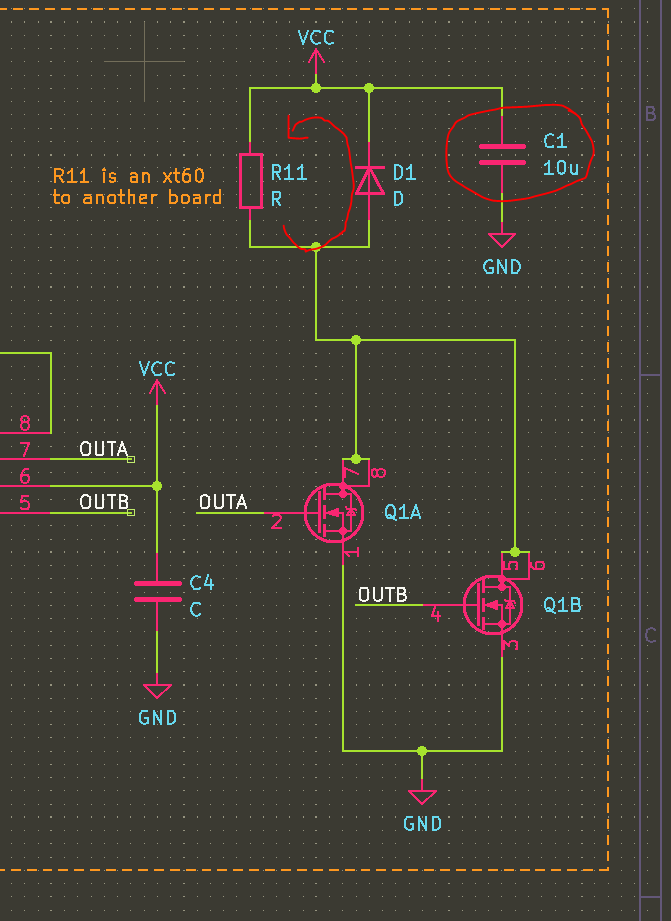
In the previous posts I shared some choices around the electrical system. The two concerns I had were not shorting out the power supply, and preventing inductive spikes from exceeding Vdsmax.
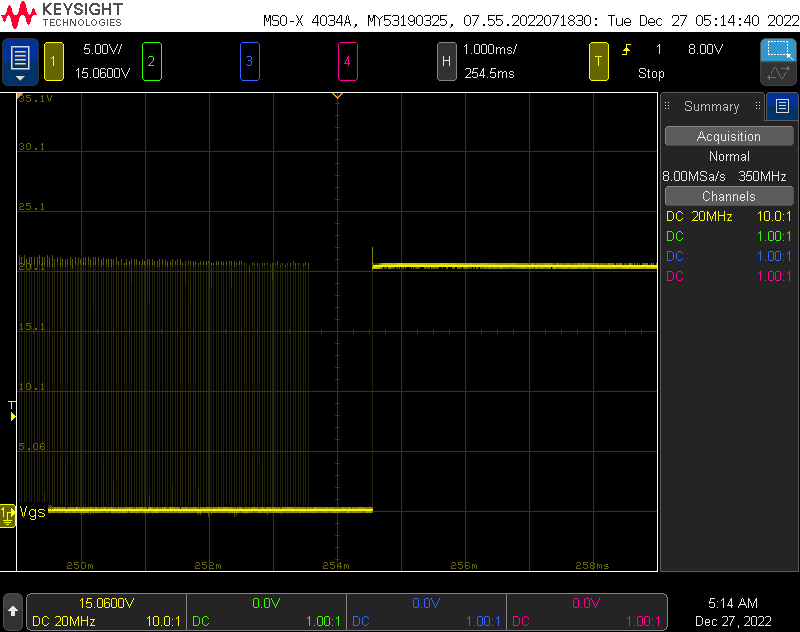
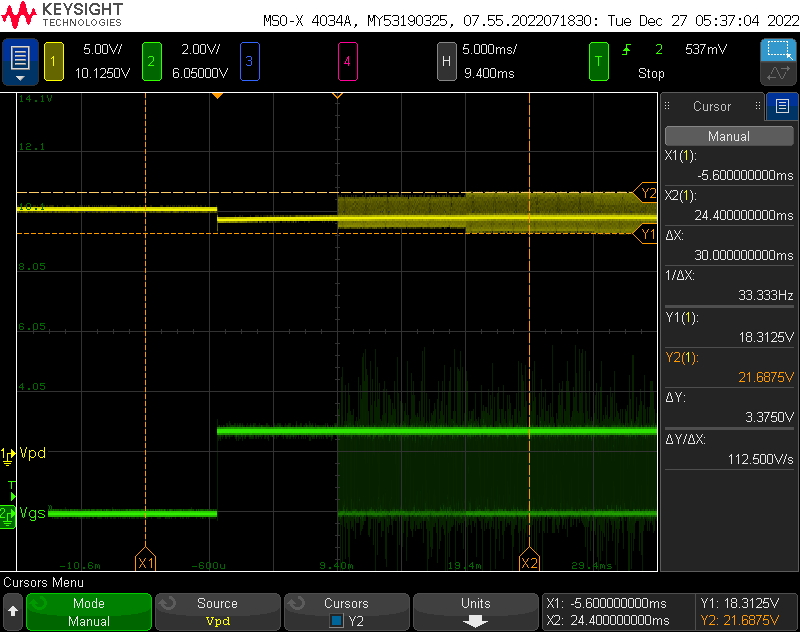
The Vgs, shown above, was totally fine since it was limited by the free-wheeling diode. Even with a 1ms charge time, the inductor failed to exceed 25V and there was very little ringing. The Vdsmax is about 30V, so there is plenty of margin.
To test power integrity, I wrote some code to turn the heater on different power levels for 10ms, starting at 100% power. As you can see, 100% power reduces the output voltage just a bit, to 19.5V. This is well within the PD specification. When the PWM begins, the power supply seems to tolerate some relatively large spikes/dips as the heater (inductive load) is switched at 25kHz.
Electrical + Control Improvements:
To get a truly performant hotplate, the resistance at 200C needs to be less than 4 ohms, so the full 100W (or close to it) can be used to maintain the target operating temperature. Doing this is tricky, because it means that at 25C the heater can’t be operated at 100% duty cycle. Basically, power is not a function of duty cycle, but of duty cycle, temperature, and board characteristics.
There are two approaches to solving this problem. One is a per-heater lookup table, that lists a reasonable safe duty cycle per temperature. This is limiting since it would need to be generated per-heater, but its not unreasonable to do that given that I will likely stick with a single heater, and most heaters should be pretty similar.
Another approach would be to add a current monitoring to the USB PD supply, and cut the heater power off once you get close to the limit. This requires a relatively high bulk capacitance to provide current, even at 25kHz, but its certainly achievable. Overall power could be modulated by adding a dead time in between heating cycles, in order to follow a temperature profile. Higher frequencies could be considered, taking into account the switching time of the low side FETs. This is basically a current-controlled buck converter.
I’ll likely stick to the first approach for now, since doing current limited control requires more hardware, and it is unlikely to really improve the outcome of my soldering.
Mistakes + Takeaways
There were a few minor circuit goofs, and some things that went surprisingly well. Here is a small list, that might help you or me in the future:
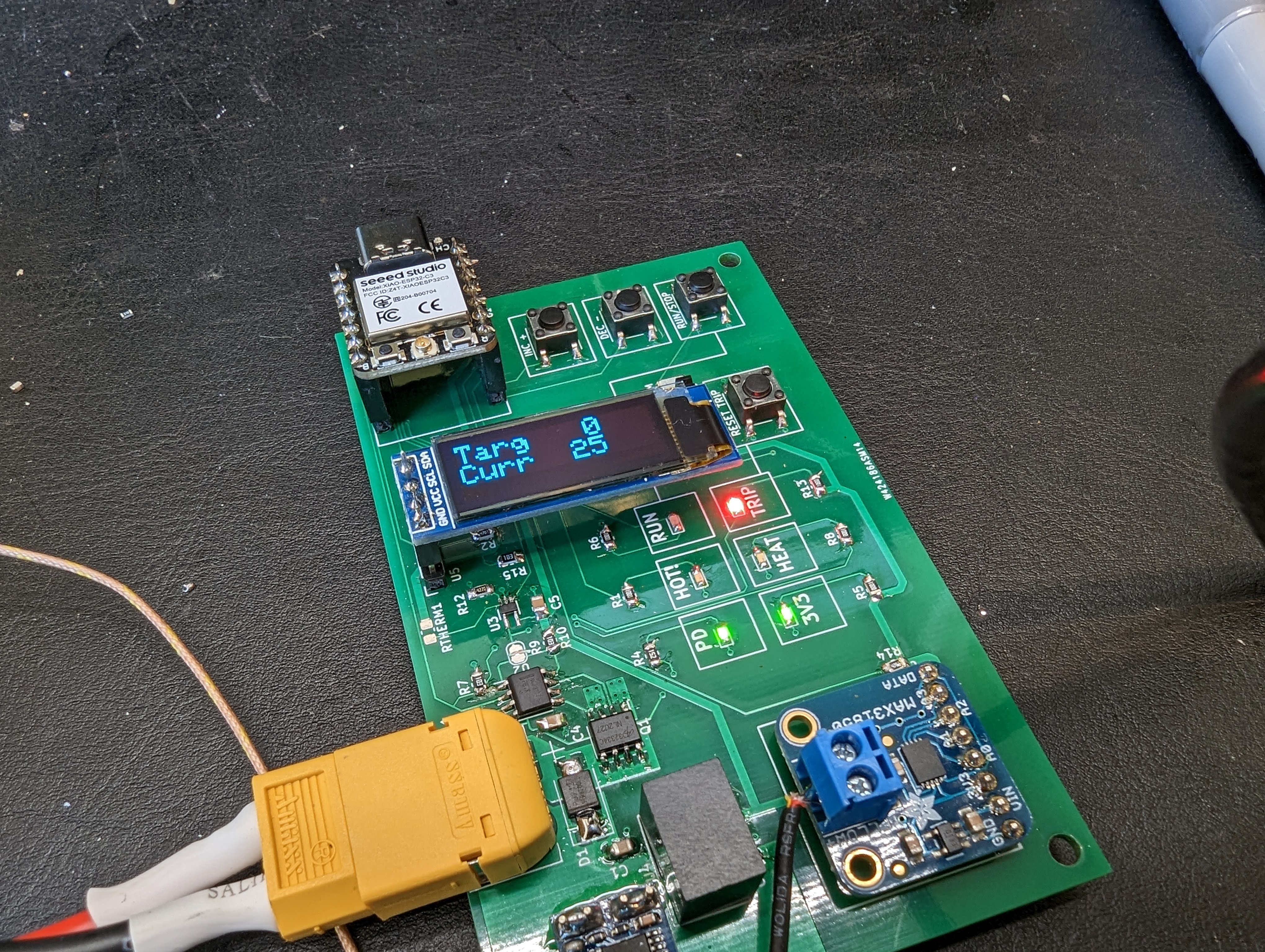
GPIO9 and GPIO8 on the ESP32 C3 are bootstrapping pins– they control what the ESP does when it boots. I connected one of them to a switch, as an input for the program. This meant that the ESP would not boot into my program, but it would boot back into bootloader mode (and accept new programs). Toggling the switch made the ESP behave normally. Note to self: use these pins carefully.
The pinecil is a pretty beefy iron. It had trouble soldering to the aluminum PCB, but with boost mode and patience it had enough power to solder directly to a 3mm wide trace on an aluminum substrate. It had NO trouble soldering XT60 connectors to large pours. Don’t let the small size fool you- it is a real iron.
It is a good idea to put indicator LEDs on things like the actual power rail and the actual HEAT signal. It makes it unambiguous that something is really happening, and that the heater is getting hot.
I added a solder jumper to the overtemperature cutoff circuit. I accidentally swapped the inputs on the monitor chip, so it didn’t work. Cutting the jumper made it really easy to test with this protection turned off.
All my temperature sensors gave wildly different readings, even when co-located. I’m not sure why, but I do trust that the delta temperature measurements were ok since they were from the same instrument with two of the same probes, and they had the same readings when physically connected.
USBC-PD can deliver serious power, and its easily obtained with USB PD trigger boards.
Next Steps:
During testing, I learned what this type of soldering setup is really appropriate for, and what the capabilities of the heater are. I want to try some of this low temp solder, and I want to do some hot plate soldering to figure out how it feels, before going back to take another pass at the heater element. I suspect targeting an even lower heater resistance will allow me to hit 200C easily with the aluminum plate.
I also have some work to do on the UI (there is a screen- I just didn’t plug it in), and on the controls. If I find it useful, I will probably build an enclosure for it to protect the electronics and to make it easier to use.
The PCB heater for the hotplate obviously needs to be driven by something. I could have put more circuits on the heater board itself, but separating them has some advantages:
if the heater element is bad, or needs reconfiguration, it can be replaced
better opportunity for a heat break between the boards
opportunity to try different heater substrates or even different heaters/heater shapes
My goal for the hotplate is to keep it simple. I decided that I really probably need one profile at most, and a manual-temperature mode. I’d rather make that profile on the computer, instead of on the device, and be able to play it back from the device. I’d also rather get information back from the plate on the computer instead of a tiny display. Hopefully these simplifications will allow a hotplate to be up and running sooner rather than later.
Here is the architecture I came up with:
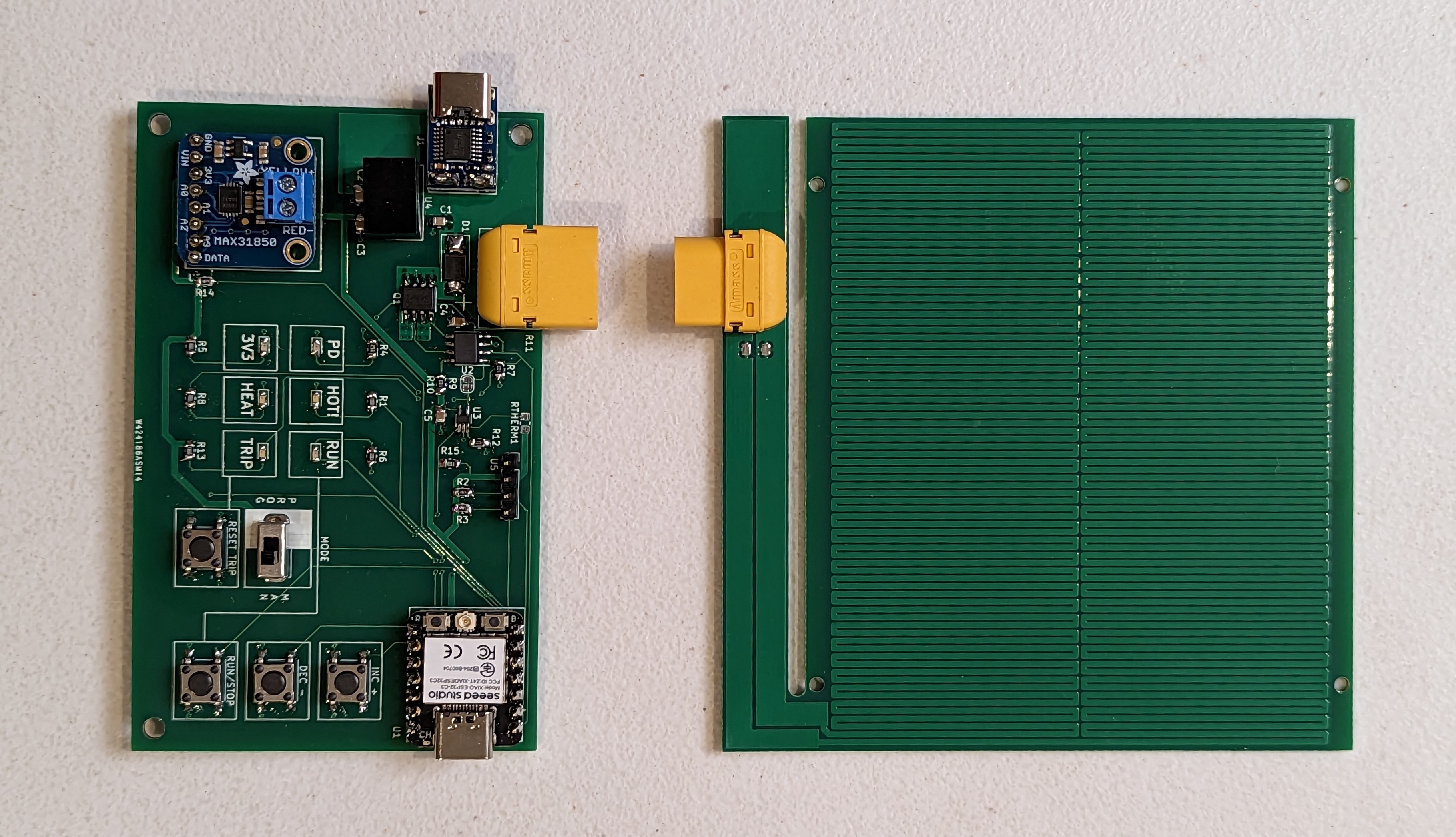
There are two usb C connections- one for programming the micro, and one for power, equipped with a USB PD “trigger” chip. My new favorite controller, the ESP32-C3 is in charge of the show (and native USB C). A single thermocouple is used for feedback, and an RTD is used as a safety cutoff- basically if it goes above some target temperature, the micro will no longer be able to drive the power FET. This won’t prevent the board from getting super hot, but it does provide a hardware safety against exceeding some set temperature if the controller spaces out…assuming the thermistor does not fall off.
Additionally there are indicators for PD power, DATA power, data transmission (heartbeat), heater power, and safety over temp, hot surface, mode, and (finally) a temperature readout. These are diagnostically useful, and they should satisfy my desire for a cool looking annunciator panel.
One annoying thing is that the ESP needs to be driven at 3v3 while the rest of the stuff is happy at 20V. While a cheap, integrated buck would be a neat solution, an LDO is so much cheaper. I decided to go with the buck, since I wanted to avoid burning extra power when operating near the 100W limit of the power supply.
The heater itself will be driven by a gate driver like the NCP81071B, which is 20V tolerant. 20V will just barely allow us to use something like the AOSD32334C, which is a dual N FET. Paralleling the FETS will reduce the RDSon to almost nothing- close to 10 mOhms.
The heater element here is represented by a resistor and an inductor- I expect the trace to have some very real inductance (100s of nH?), which will cause a large voltage spike when the FET turns off. This could easily exceed the 30VDS of the FET, and cause it to break down. The flyback diode will hopefully prevent this. Additionally, a capacitor Cbulk will be chosen to prevent over-drawing current from the power supply. At 20V, the 3.3 ohm heater will draw 6A, while the maximum allowed current is 5A. By PWMing this, the average current will be below or at 5A, but when the heater is on that current needs to come from somewhere- the bulk capacitance C.
To connect to the heater itself, I am using an XT60 connector. These are low-resistance and they seem easy to get, due to their use in drones.
Safety + Temperature Monitoring
There are a lot of ways making a big heater that is capable of destroying itself can go wrong. Ultimately this device falls under the category of things you should unplug if its not in use, and definitely not something to leave running unattended. However there are a few details I added as a nod to safety.
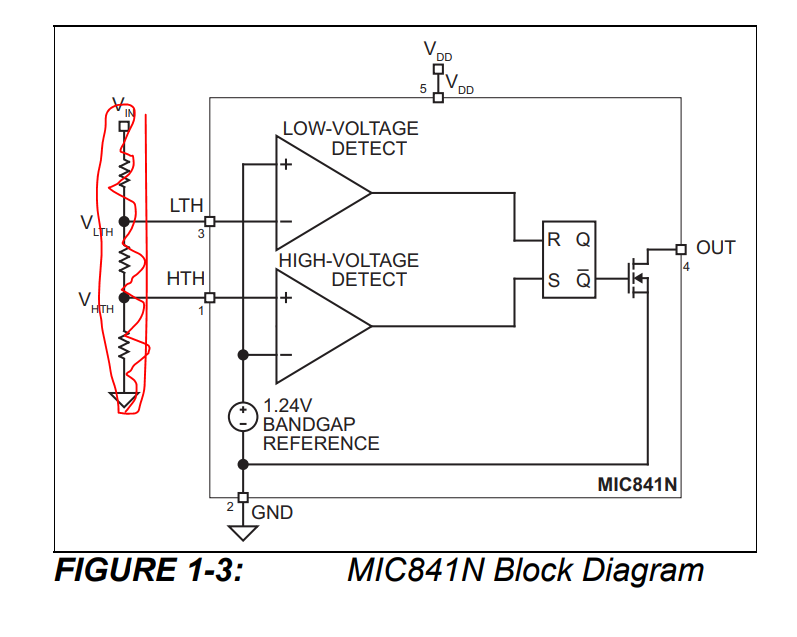
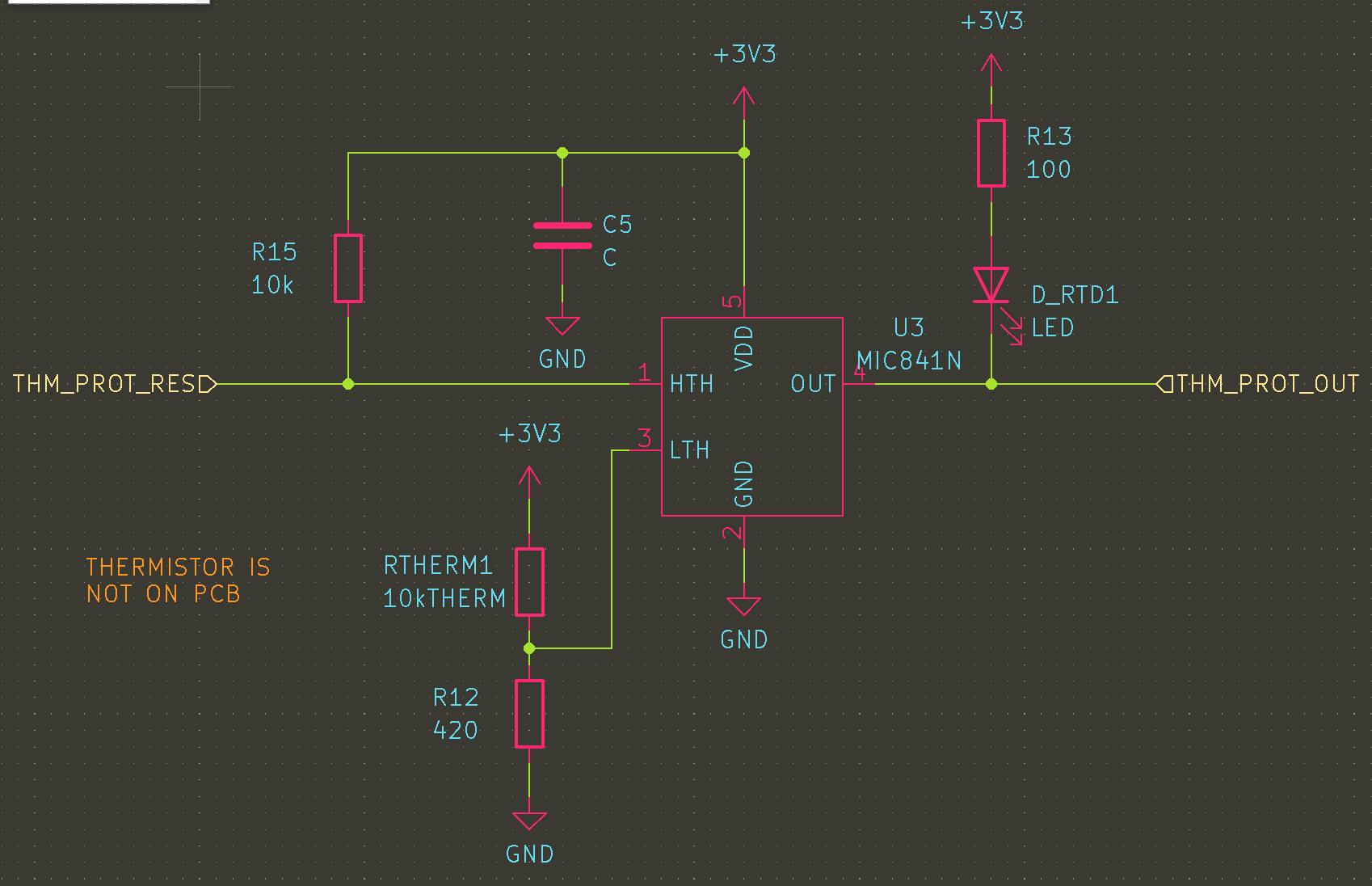
The first is a thermal trip based on the MIC841N The HTH input is fed by a NTC resistor divider that exceeds the 1.24V reference at about 200C. This SETs the latch, so the inverting output goes low, pulling down the enable pin of the fet driver. This is the case until either the whole circuit is reset (and the thermistor has cooled off) or until the reset line is pulled down by a button. Resetting while hot should result in an illegal state where ~Q is still 0.
Note: this circuit totally fails if Rtherm is removed, and it wont work if Rtherm gets disconnected from “the hot part”. If I wanted to add more logic, this could be resolved, e.g. inverting the logic of the resistor bridge. However, this is currently just a secondary protection. If it works nicely it can be refined later.
Temperature monitoring (for feedback and control) will be done with a thermistor dropped either onto the heater, or onto the target PCB. This allows for point control, near the stuff that you care about. For the time being, this will be made out of a MAX31850 thermocouple breakout that I have lying around from years ago.
Next Steps
With the heater and the controller designed, its time to get them made and then patiently wait for them to arrive!















 AyLo
AyLo 