Northside Social

DCIM104GOPRO

The approach to NoSo

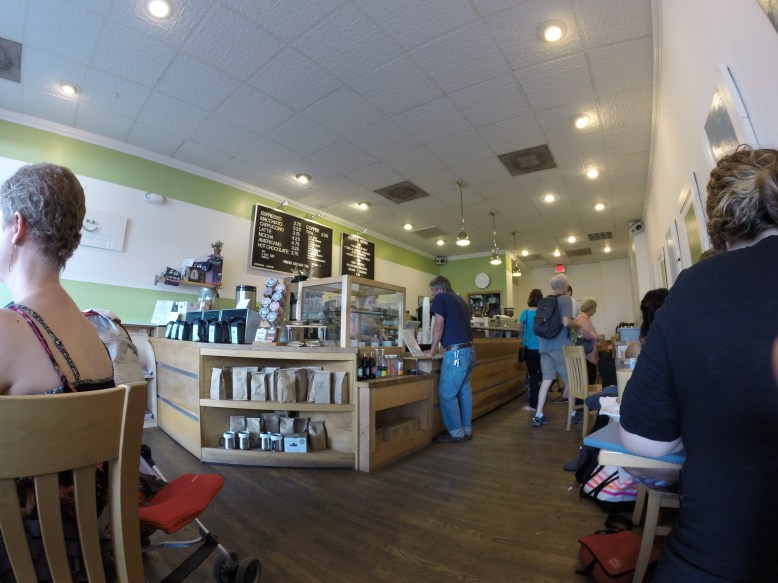
Northside Social, or “NoSo” is out in what might be considered the suburbs of Washington D.C.  It is a huge building, boasting ample patio seating, a huge first floor, and a second floor which is a wine bar (with an espresso machine).  It is certainly the biggest coffee bar I visited on my trip, and it is open late because of the wine bar- this made it the ultimate destination for my day 1 trip, since I could arrive at just about any time and still expect the place to be open.

I had a cup of drip coffee, roasted by intelligentsia.  I may have been a little exhausted and buzzed at this point, but I would describe the coffee as smoky and acidic, with a fruity aftertaste.  It is worth noting that there are two options for drip coffee- a regular cup, and a “mug” of coffee which is two 10 oz mugs of coffee (one refill).  I am impressed by how considerate and innovative they are with this offering- this is the only place I have seen something like this on the menu, almost explicitly inviting you to stay for as long as possible.

DCIM104GOPRO

2nd Floor/Wine Bar

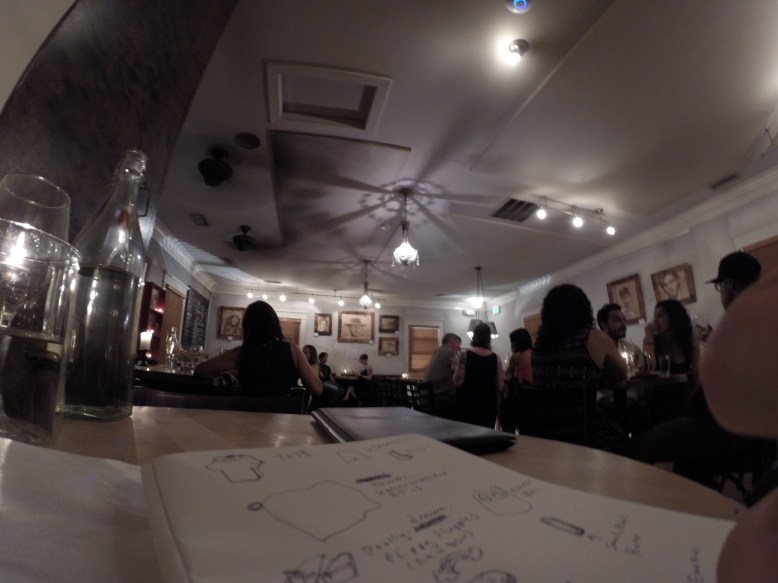
The inside of the cafe is tastefully decorated in coffee-drip paintings of famous actors and personages.  The tables are wooden, and plentiful.  Towards the back of the cafe the tables get  little less uniform, but they is still a ton of seating.  The second floor wine bar is decorated with more paintings, and is furnished with light wood tables and bar stools.  If you look carefully, you can see Clint Eastwood in the photo above.

The wine bar was equally as inviting and as accommodating as the coffee bar.  I ordered a highly modified and delicious grilled cheese for dinner, while I made some notes on my trip so far (pictured above).

SlipStream

DCIM104GOPRO

DCIM104GOPRO

Slipstream was not on my original list, but as I was headed to compass coffee on day 2, I passed it.  One of the rules of coffee travel is that if you come across a decent looking cafe, you must go- so I went!

It turned out to be a great decision.  First off, I was hungry, and their breakfast food options were much better than any of the other coffee shops I visited that day.  Second, they have good coffee, as well as coffee cocktails-  not something you see everyday (or ever, in MA).  I was sorely tempted to try one of the coffee cocktails, but it was 8 A.M. and I had a long day of coffee ahead of me, so I opted for my gold standard of coffee comparison- a cup of black drip coffee.

DCIM104GOPRO

toast for breakfast

The coffee is apparently roasted by “Madcap Coffee” and it is balanced between sweet and acidic.  It is not unlike el gallo blend, but it is balanced instead of acidic.  It was served in a notneutral lino coffee mug, which is actually a fairly normal looking white mug.

The bar stools and chairs are a light colored wood, while the tables are stained a dark walnut color.  I think this brings attention to the weighty tables, over the chairs, which are comfortable but unremarkable.

DCIM104GOPRO

The back, under the skylights

The lighting is interesting and worth noting, since the place is a single large chamber that serves as both a brunch spot, a bar, and a coffee shop.  It is modern and clean, with lots of glass, wood, air and light.  Most of the light is provided by the floor-to ceiling windows at the front of the cafe, as well as the skylights at the back of the cafe.  The rest is rather dimly lit by reflected light from the outdoors, and more indirect lighting from large domed reflectors on the ceiling.  This means that there is little in the way of direct lighting, making the inside seem soft.  In the daytime this gives it a cool, shady feeling, and I imagine at night it gives it a nice bar ambiance.

I am very happy that I made the stop at slipstream.  I ended up with a full stomach and plenty of time left to explore the rest of the city.

Compass Coffee

DCIM104GOPRO

Compass Coffee

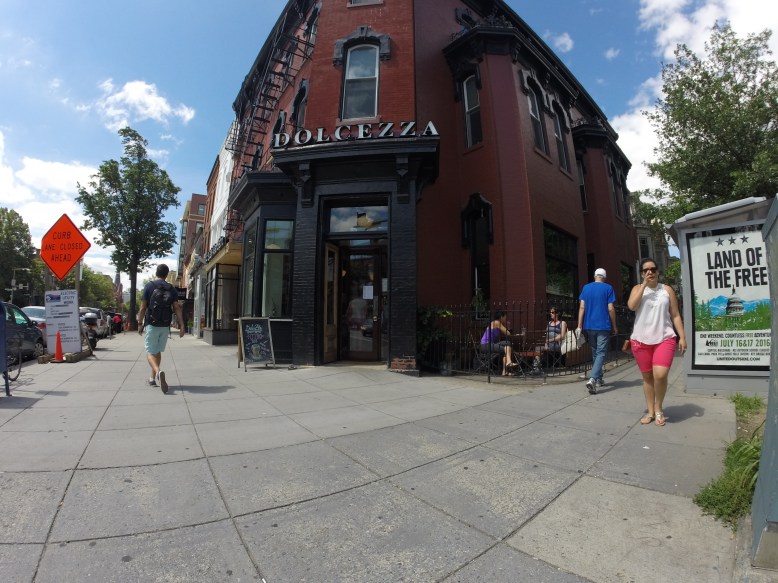
Compass was my first planned coffee stop for the day.  The location I visited was just a few bus stops from the Dolcezza.  It is a single-story brick building packed to the gills with coffee products, seating, and what appears to be the compass coffee roasting operation.

I ordered a small drip coffee, which was made with their cardinal blend, and a saag-paneer filled pastry, similar to a bao.  The pastry dough was sweet, and the sag-paneer was spicy and bizarre, but in the best way.  The coffee was smoky and sweet, a little acidic but not very fruity.  The coffee was served in a paper cup.

DCIM104GOPRO

Roasting operation

I sat at a bar in front of their coffee roasters.  Like slipstream, light was provided mainly by numerous skylights and windows rather than with artificial lighting.  This, combined with the brick, gives the place a warm glow.  The place was pretty packed, with a long line when I arrived.  But there was plenty of space inside, and I think pretty much anyone who wanted a seat got one.

DCIM104GOPRO

Sitting area

As you can see in the photo, they have pretty much every kind of cafe chair, ranging from various heights of 4-legged metal stools, to orange and white metal chairs.  The wood was mostly light colored pine and veneer, which was complemented by the white paint and tile.  The somewhat high ceiling and skylights give it an airy, clean, and open feeling.  this feeling conflicts somewhat with the general cramped mess and busyness of the floorplan.

Chinatown Coffee Company

DCIM104GOPRO

The unassuming entrance

The CCC lacks the usual signage out front, but once you get inside, it is clear that it is a coffee shop.  They seem to serve intelligentsia coffee, but they also sell retail heart coffee.  As one would expect, the coffee is good. The coffee was balanced, with a smoky aftertaste.  It was served in an hourglass shaped diner mug, like the ones that Diesel sold before switching to intelligentsia-ware.

DCIM104GOPRO

This shop is long!

The interior of the shop is long.  The grey bulkhead that comes out of the ceiling, the rail, and the long coffee bar all help make it seem even longer, emphasizing a far away vanishing point.  Their logo is three cups over two bars, which is similar to the flag of the District of Columbia.  Definitely clever.

On the left side, there are small four legged stools mixed with creamsicle chairs- white on the outside, orange on the seat.  These seats face each other over low spool tables.  In the front of the shop there is a bar at the window, and two very expensive looking tables with matching benches.  These feature a dark wood tabletops, metal frames and narrow benches.  It was a surprisingly comfortable spot to sip my coffee and read my book.

Peregrine Coffee


DCIM104GOPRO

Peregrine next to NOT Peregrine (La Pain Quotidien)

Peregrine Coffee was the first stop on my coffee tour.  It seemed easy to get to form the Hirshhorn and it would be my only stop out on the east side of DC.  I arrived at about 4:00, drenched in sweat from my two-block walk over from the East Market stop on the Blue Line.  Say what you will about the heat on the west coast, but at least it is a dry heat!

This location is located right next to a non-peregrine cafe.  I was almost lured into buying coffee from them but the brew-o-matic and lack of coffee menu made me think twice, and check outside.  Sure enough, Peregrine was right next door.

Since it was about 90 degrees and humid, I opted for a smaller espresso instead of my usual small black coffee (the real standard for judging a coffee place).  I also ordered a ham and cheese pastry.

The pastry did not inspire any real confidence in me, with its single roll of ham and sparse cheese, but I devoured it anyway since I was hungry.  It was decent-edible but not a reason to come back.  Eventually my espresso was up (after a mix up that almost landed me with a macchiato).

The coffee on the other hand, was short- by that I mean it was a single shot of espresso.  One unusual thing I learned is that in DC, espresso is normally a single shot instead of the doubles you find in Boston and LA or SF.  Overall I was happy with the coffee.  It as fruity and the acid was fairly balanced.  They clearly have some idea of what they are doing over there with their machine and their counterculture coffee (they also have a house peregrine brand).  It was served in a standard white saucer/espresso cup/spoon, along side what I assume was supposed to be sparkling mineral water in a libbey druatuff glass.  Unfortunately this turned out to be lukewarm water, which was trumped by the free ice water they were also serving.

DCIM104GOPRO

Pear Eh Grin

The decor was cute, but not in a way that stands out.  It felt like it was new and nice, and organized.  Inviting, but not too exciting.  They did have a funny rendition of their name on the wall (pictured above).  There is interior and exterior seating available.  The inside consists of a small square of tables in the front (about 4 people/table), a bar for seating for three, and another line of tables going back to the back of the cafe, each seating two.  Next to the line of tables is the coffee bar, including a pastry case, espresso machine, and retail area.  This cafe (like the rest of the ones in DC) also boasts a restroom.  Outdoors there are five tables that can probably seat three people each.

DCIM104GOPRO

Nice, clean, but not exciting

The tables and chairs were a light blonde wood, probably pine.  The outdoor furniture is metal painted that rustoleum-lawn-furniture-green.  The counter echos this theme with a light wood and glass construction, giving the whole place a friendly (but not enlightening) interior.

Baked and Wired

DCIM104GOPRO

Line for days!  If you want coffee, you can probably skip it

When I arrived at Baked and Wired, after a bus and a schlep down 30th street,  I was extremely unenthused to find a line out the door.  What I did not know was that Baked and Wired is one of “those places” where people queue outside in 85 degree heat to buy expensive and trendy pastries.  There is nothing wrong with that, but typically this is not my scene.  I typically prefer a spot where I can grab a quick cup of coffee and a seat and spend a few hours lost in a book, writing emails, or pretending to be productive in some other way.

DCIM104GOPRO

The coffee bar, featuring finger

Once I was inside, I realized that it is actually that kind of place, or rather half the store is that kind of place.  There are actually two totally separate counters inside, one for coffee and one for baked goods, which form a delicious symbiosis.  From the bakery, I purchased a pistacio cupcake.  From the coffee bar, I bought a cup of coffee.

The coffee was acidic and a little fruity- a nice sharp note compared to the creamy sweetness of the cupcake.  And unlike most cupcakes, this one had little nut-nuggets in it to add a nice texture.  Together, the two of them made a lovely afternoon snack.  Alone, I think the coffee would have still been drinkable, but the cupcake certainly enhanced the experience.

DCIM104GOPRO

Blurry, but you get the idea.  ft. finger

The decor could best be described as mixed.  The coffee bar area has no seating.  The bakery is standard contemporary-cute and displays cupcakes under glass beakers.  Down a few steps from the bakery, there is a massive shell-shaped couch that faces an american flag.

DCIM104GOPRO

Bizzare

In the back, things get real weird.  Napinks are attached to napkins with baked and wired stickers in what must be a fire marshalls nightmare.  Somewhere under all the napkins, I am sure there is a wall with more napkins attached to it via stickers.  Each leaflet in the strata is marked with a thoughtful doodle or a few words.

La Colombe

DCIM104GOPRO

La Colombe!

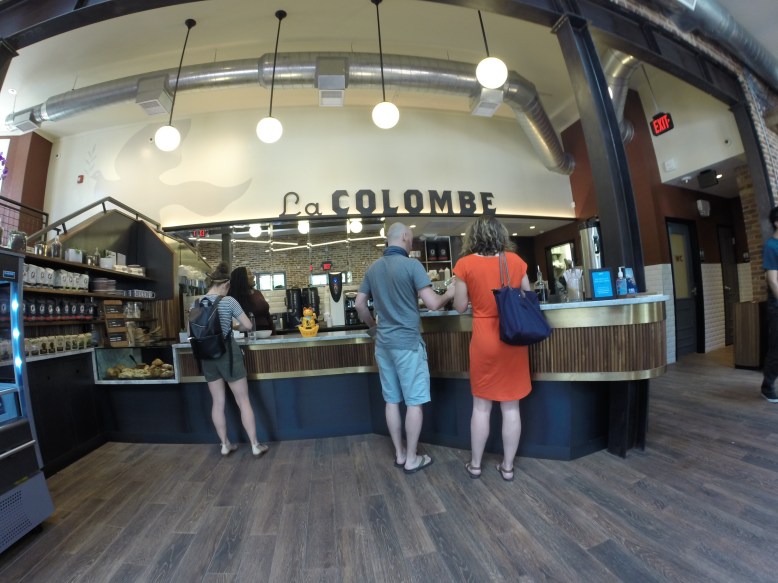
La Colombe was (and is) my ultimate stop for coffee in D.C.  Ultimate in both senses of the word- final, as well as the best.  If you want to have the best coffee that I found in D.C., this is absolutely the place to go.  Sadly, I did a terrible job of getting photos of it, so you will have to bear with a mostly-words description.

La Colombe is decorated with sedate walnut stained wood, warm brick, and cool steel.  Everything else is black.  The lights are a slightly warm white, and are augmented (and overpowered) by a large skylight and by the windows.  The indirect light from is very warm since it is reflected off the reddish brick and wood surfaces.  The chairs and furniture appear to be site-specific and have matching stain and hardware across the store.  One notable feature is the black and brass features on the furniture- something I have not seen elsewhere.

The coffee was amazing.  I had something fruity from their workshop selection, and it was easily the best coffee I have had in at least a year- maybe more.  I described it in my notebook as “it smells and tastes of cherries.  It is acidic, fruity and clean”.  The coffee was served in a highly decorated mug, with blue and red floral and bird patterns.  The saucer had a matching bird and floral pattern.  Easily the coolest mug to date, aside from the old monkey-on-a-rocket-ship mugs from Diesel.  That is high praise coming from me!

The Best Coffee In Washington, D.C.


I visited D.C. over the weekend of the 9th to see an exhibit by one of my favorite artists- Robert Irwin.  After that I had a couple days to kill and I decided I would go on a coffee tour of the Capitol.  Based on recommendations from friends and cafes that I stumbled upon, I managed to visit 9 cafes in the D.C. area.  Below are my comments on each one.  Check out the map above for information on location and my recommendation.

Green Star = Best coffee in the area!

Green Pin = I visited and the coffee was good

Blue Pin = I visited a different branch and the coffee was good

Red Pin = I did not visit any of these cafes

Diamond = Would not recommend, better coffee nearby

My strategy was to hit all the outliers that had late closing times on my first “day” from about 3-8, and then sweep the Green/Orange line stops on my way to Union Station on day 2.  I decided to add peregrine to the list of day 1 locations so that I would have about 4 cafes on day one and 4 on day two- to even out the coffee intake.  The day one list was peregrine, filter (since foggy bottom was closed on the weekends, I ended up going to Dupont circle), Baked and Wired, and finally Northside Social, which was far away but had late hours.

Day two began, surprisingly, with Slipstream and Dolecezza, which I happened to run into on the way to Compass Coffee.  After Compass I hopped a bus down to Chinatown Coffee Co and finally La Colombe.

Northside Social

Peregrine

La Colombe

Baked and Wired

Filter

Slipstream

Compass Coffee

Chinatown Coffee Company

Custom Service with SD110 the NRF51288

As a person who makes their living in the IOT world, I decided it would be handy to learn how to get data to and from the venerable NRF51288, which is certainly a contender for the best bluetooth SoC out there.  One annoying thing is that the wonderful Softdevice that Nordic provides does not have a particularly clear English translation, or good pictures in their documentation.  Here I will try to describe with pictures and arrows that my mechE brain is accustomed to, instead of with comments like “Attribute metadata for the User Description descriptor, or NULL for default”.  Hopefully after reading this, you will have a better feel for how to make a custom service, as well as what the more formal terms are for the different parts of the service in the softdevice API.

How to read this:

The 10,000 meter view will start with the softdevce and the GATT server, then at 1,000 meters, we will inspect bas.h to see what the minimum viable functions for a bluetooth service are.  At 100 meters we will look at the softdevice calls that add the information to the GATT server.  at 10 meters we will look at what gets passed to those calls- the real key to understanding how to add things.  At the very end, I will show you how I changed the bas example to report acceleration values.  This is by no means a definitive guide, but hopefully it will give you a jumping off point for adding services to your code.

10,000 Meters: GATT and the Softdevice

path3459-1.png

The thing we want to do is add a new service to our Generic Attribute Profile (GATT) server.  Adafruit does a wonderful job of explaining it here, with pictures.  Once you connect to a BTLE device over a Generic Access Profile (GAP), your bluetooth client, usually something like a phone or computer, can access the GATT server, usually something like a the NRF5.

A GATT server can have characteristics, as well as services.  Services are groupings of characteristics.  Services are distinguished by a 128-bit UUID.  Some of them are reserved for particular types of services, like a heart rate monitor, but we will deal with making sure we don’t use those later.  Two that are always included are the Generic Access Service and The Generic Attribute Service.

Characteristics live inside of services, and have characteristic values.  These characteristics can also have descriptors, which can tell you useful stuff like what the name of the characteristic is.  Characteristics are things that can be read and written to the server.  A client might read log data or a sensor value, and it might write a new state for the device or a device name.

The way that you access the GATT server on the NRF51288 (as well as the NRF52) is through the nordic softdevice (SD), which is a pre-compiled binary that you append to the beginning of your user application code.  It handles all the GATT and GAP stuff, and you need to tell it to do things like add services and characteristics using calls to the softdevice that are provided by nordic.

1000 Meters: What is in bas.h

typedef struct
{
...
} ble_bas_init_t;

typedef struct ble_bas_s
{
...
} ble_bas_t;

uint32_t ble_bas_init(ble_bas_t * p_bas, const ble_bas_init_t * p_bas_init);

void ble_bas_on_ble_evt(ble_bas_t * p_bas, ble_evt_t * p_ble_evt);

uint32_t ble_bas_battery_level_update(ble_bas_t * p_bas, uint8_t battery_level);

Taking a look at an abbreviated version of what is in bas.h will let us know what kinds of things a a bluetooth service might need to do, and what kind of stuff we should have to use the SDK as a template.  Here is a listing of the most important stuff in bas.h

Structs:

ble_bas_init_t- this holds all the data for initializing the service

ble_bas_t – this holds all the data for actually running the service

Functions:

ble_bas_init – this initializes the service, and inserts your vendor specific UUID, your service, and characteristics into the softdevice

ble_bas_on_ble_evt – this is called when the softdevice thinks something interesting has happened over BT that concerns the bas service.  For example, a client might write a new value to the server, or want to read a new value from the server.

ble_bas_battery_level_update – this actually updates the value of the characteristic with the new battery level.

So, all the stuff you need is in ble_bas_init_t and ble_bas_t, for the actual data about the services, and then you call ble_bas_init and it gets added to the softdevice.  After that ble_bas_battery_level update gets called every now and then, and if anything interesting happens bluetooth-wise to the service, ble_bas_on_ble_evt handles it.

100 Meters: Adding a Service and Characteristics

Of these, ble_bas_init and ble_bas_battery_level_update are the most interesting functions, so we should look inside of them to see what is going on.  Here we will be focusing on sd_ble_XXXXXX calls, which actually add things to the Bluetooth Low Energy SoftDevice- hence sd_ble.  later we will go back and look at what we are actually feeding these functions.

ble_bas_init is a small function , but it also calls batter_level_char_add which we will need to take a look at- it is something we did not see in bas.h, but it adds the actual battery level characteristic to the service.  The big ble_sd calls here are:

BLE_UUID_BLE_ASSIGN

this is just a macro to put the BLE_UUID_BATTERY_SERVICE information into a struct for later- if we want to make a custom service we will have to do it a different way, since our custon ble UUID needs to be added to the softdevice.

sd_ble_gatts_service_add

This adds our service.  There are some options here, but as long as you have this you will be able to see a service with the BLE_UUID_BATTERY_SERVICE if you look at your device with something like the nrf master control panel app.

inside of battery_level_char_add, a lot of other ble_sd calls happen- lets take a look!

sd_ble_gatts_characteristic_add

this actually adds our characteristic.  This is pretty useful, since we want it added.

sd_ble_gatts_descriptor_add

this actually adds the descriptor of the characteristic to the characteristic.

10 Meters: What goes into Softdevice BLE Calls

This is the real dive into the nonsense that is the NRF5 SDK.  I think that a flow chart/visual way of organizing this information is nice, although you have to zoom way in to read the text.  This is just another way of organizing the data, but instead of having to jump around a bunch of windows and files, I put it all in one place- like a cheat sheet.

These are meant to be read from the bottom up- look at the “what can you control” bar to see what you can change, the “where it comes from” bar to see how to actually make the change, and then the “where you can put it” bar shows where you need to put the variables in the sd_ble call.

sd_ble_gatts_service_add

text4926-7

This char has three layers explaining the arguments of the sd call.  The bottom layer is what you can change, the middle layer is how to generate the change, and the top layer is the actual argument and type that gets passed to sd_ble_gatts_service_add.

Here you can change the type of service between primary and secondary.  A secondary service is a service within a service, which seems fairly unusual.  You can also set the UUID of the service.  If you want to use a bluetooth SIG approved service, then you want to something like:

BLE_UUID_BLE_ASSIGN(ble_uuid, BLE_UUID_BATTERY_SERVICE);


which is a macro that will fill the appropriate fields of ble_uuid with the info for a battery service UUID. NB, if you put weird characteristics inside of this service, the client may not be able to find the correct data, and you will not be compliant with the BTLE spec.

If you want to make your own custom service, you should do something like

sd_ble_uuid_vs_add(&acc_acce_uuid, &p_acc->uuid_type);
ble_uuid.type = p_acc->uuid_type;
ble_uuid.uuid = BLE_UUID_TYPE_VENDOR_BEGIN;


This will make a new vendor specific (vs) UUID and then you manually stuff the values into ble_uuid before passing it to sd_ble_gatts_service_add.  When the function is called, the softdevice will write to the pointer for the service handle.  This is important for later on, when you may want to modify the service- for example, adding a characteristic.

sd_ble_gatts_characteristic_add

Here you can change the service the characteristic is attached to, the characteristic metadata, and the structure that holds the characteristic value.  Just like sd_ble_gatts_service_add we also pass it a pointer to a handle that gets filled in by this function.  Unlike sd_ble_gatts_service_add there are about a million things that go in here, so each one will need its own diagram.

In the bas service example, we are adding a battery level characteristic to the service, so we should pass in the handle that was written by sd_ble_gatts_service_add.  We could pass in any service handle that was written by the softdevice, and it would add the service to that softdevice.
g6568.png

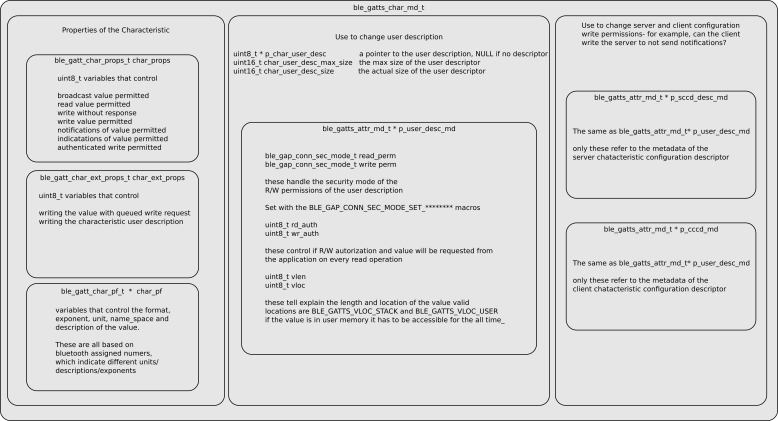
The characteristic metadata is how you control the properties of the characteristic, such as the read/write permissions and user description (a text description of the characteristic), but nothing to do with the value itself.  It has many many fields and some of those are actually other kinds of metadata structs.  The main groupings of structures are:

First, things that have to do with the properties of the characteristic, such as broadcast, indication, notification and read write permissions, writing with queued request and writing the characteristic user description, as well as the use of bluetooth assigned numbers to indicate the unit, exponent, and format, of the characteristic.  These are all about the actual characteristic and the value that it represents.  This is useful if you wanted to say that the value you are sending to the client is a uint16_t that represents micro-coulumbs for your battery measurement.

Second, the user description- this is really handy if you want to have a string associated with the value that you send that says “battery level”.  Here the important things are a pointer to a string buffer that holds the value, as well as the current length of the value, and the maximum length. Maximum length is important if the descriptor is re-written.  The last part of this grouping is the ble_gatts_attr_md_t, which controls how the description can be read and written.

The final grouping has to do with permissions around turning on and off notifications and indications, which live in the Server Characteristic Configuration Descriptor (SCCD) and Client Characteristic Configuration Descriptor (CCCD).  This post does a decent job of explaining it.

g6742

The last thing that goes into sd_ble_gatts_characterisitc_add is a structure that holds the characteristic value contains two main groupings.  The first is a pointer to a buffer that holds values of the characteristic, as well as information about the max length of the buffer, the size of each record in the buffer and the current offset.  The other grouping contains the metadata about r/w permissions.

sd_ble_gatts_descriptor_add

This is the last softdevicecall, and mercifully it is pretty short.  Just like the other calls, you give it the handle of the characteristic it belongs to, as well as a pointer to store the handle for the descriptor.  The only real data you need to set up for it is a ble_gatts_attr_t which is the same as the one used in the sd_ble_gatts_characteristic_add call.

1 meter view- Custom Service

Lets make a new service- this will document the major changes from bas to a custom accelerometer service with three characteristics that represent x, y, and z accelerations.  For the sake of clarity, we will assume there are functions that do things like get the accelerometer data.  I will show code snippets in the post, but you can also see the whole project here, commit 705deb.

First off, we need to add a custom UUID to our service in ble_bas_init.

ble_uuid_t ble_uuid;
ble_uuid128_t acc_acce_uuid = {{0xAA, 0xCA, 0x55, 0xAC, ..., 0xEF}};

err_code = sd_ble_uuid_vs_add(&acc_acce_uuid, &p_acc->uuid_type);

ble_uuid.type = p_acc->uuid_type;
ble_uuid.uuid = BLE_UUID_TYPE_VENDOR_BEGIN;


This adds our new made-up UUID to the softdevice, and then we pack the data into ble_uuid for later use in sd_ble_gatts_service_add.

Next up, we need to make some characteristics to belong to this service!  I will focus on only one characteristic here, because they are all acceleration data (just in different axes).

Compared to the battery level, we will want to make it a uint16_t instead of a uint8_t, give it a text description and add some nice units to our characteristic.

Lets start with making the value a uint16_t.  To change this in the GATT server, we will need to edit the ble_gatts_attr_t that represents the characteristic value that gets passed into sd_ble_gatts_characteristic_add.  In the code, that is called att_char_value.  To make the characteristic value a uint16_t instead of uint8_t, we need to do this:

attr_char_value.init_len  = sizeof(uint16_t);

attr_char_value.max_len = sizeof(uint16_t);


This will change the expected size of the record in the characteristic.  Now it is expected to be a uint16_t.  NB this only changes what the softdevice expects, so there are several other places in the code that will need to be changed to use the proper variable size.

Now for the text description.  This is handy, because your app might want to know what each characteristic represents, other than some crazy uuid.  This is pretty easy, since this information lives in the ble_gatts_char_md_t struct that we already passed to sd_ble_gatts_characteristic add.  We just have to change it by actually making a char buffer and passing the information about the user description size and max size into the struct, like this:

uint8_t user_desc[] = "ACCEL";

char_md.p_char_user_desc = user_desc;

char_md.char_user_desc_max_size = 5;

char_md.char_user_desk_size = 5;


We also have to give ble_gatts_add_descriptor an idea of the read/write permissions for the description.  We do this with a ble_gatts_attr_md_t

ble_gatts_attr_md_t user_desc_md;

memset(&user_desc_md, 0, sizeof(user_desc_md));

BLE_GAP_CONN_MODE_SET_OPEN(&user_desc_md.read_perm);


Although I could have set whatever permissions I wanted.

Finally, this all gets put into sd_ble_gatts_descriptor_add via the attr_char_value that holds all of the data.

Finally, lets add presentation format data.  We make a presentation format characteristic variable and put some values in it:

ble_gatts_char_pf_t accel_pf;

memset(&accel_pf, 0, sizeof(accel_pf));
accel_pf.format    = BLE_GATT_CPF_FORMAT_UINT16;
accel_pf.exponent  = 0;
accel_pf.unit      = 0x2713; //code for acceleration


then add it to the characteristic metadata:

char_md.p_char_pf = &accel_pf;


With this field filled in, it will automatically be added when the characteristic is added with sd_ble_gatts_add_characteristic.

0 Meters: Inspecting The GATT Server

Screenshot_2016-07-03-15-10-42

To check to make sure the device is working properly, I used the nrf master control panel app to connect to and interrogate the GATT server.  As you can see, everything is working!
“Gravity” app for Misift Flash

After a long trip to CA, I am finally back at working on fun stuff.  First up is an app for the Misfit Flash that lights up the lowest LED on the board.  Source is here, but it is a bit hapazard and documentation is somewhat scarce.  So if you are going to build it make sure you have a few minutes.

The how:

This technique assumes that the board is not accelerating at much more than 1g in any direction- in other words, gravity has to be the dominant force.  It would not work very well if you were in a car speeding up, but it would work ok you were in a car with a constant velocity.

unit circ illus.png

To determine which way is down, I read the accelerometer and look at the X and Y components.  The Z does not have very much information for me, because tilting the board to the same angle in any direction will give you pretty much the same Z value.  The Z value would be good for something like a bubble level, but it is not useful here.  Another way to think about it is that a gravity vector straight down is being decomposed into ijk vectors that are fixed to the reference frame of the board.  We want to know in the ij plane which way is most “in line” with the gravity vector.  The X and Y axes of the accelerometer are collinear with the i and j unit vectors in this case.

The X and Y components form a vector that points in some direction on the face of the board (orange vector above).   Each LED lies along an imaginary circle with a radius of 64 units, although I show it as a unit circle above.  Each of these direction vectors is dotted with the XY vector, which gives a “score” of how much the XY vector is pointing in the direction of the LED.  The vector with the largest score has its LED illuminated.

Other Approaches and improvements:

atan

There are simpler ways to do this with non-integer math and conditionals, but floating point math is apparently “expensive” on a M0.  The easy way to do it with floats would be to make a table of inverse tangents, and find the ratio between the X and Y components.  Then it would be simple to just look up which range you were within- for example the 2 o’clock LED here is between .25 and .66.  There would have to be special provisions if X were ever 0 to avoid a division by 0 error, but that would be pretty simple.

An easier optimization would be to get “hints” from the sign of the XY vector, if optimizing for speed.  right now, each 12 dot product operations and 12 conditionals are evaluated each time.  This could probably be cut down to 4 dot products and 6 conditionals if by looking at the quadrant of to do the dot products in first, depending on the value of the XY vector.  Given that the processor is only doing one thing, it does not seem like it is useful to implement.